
Using Name Config Setup
In CoreMIDI the “name config” property of MIDI devices associates MIDI name documents with them. MIDI name documents allow patches for MIDI devices to be selected by name.
The Name Config Setup panel in MyJazzBand lets you set this name config property for your MIDI devices. Open it by choosing MIDI > Name Config Setup....
The MIDI device with which a MIDI name document is to be associated must have already been added in Audio MIDI Setup.
When a MIDI device is first added in Audio MIDI Setup, no master MIDI name document is associated with it. When that device is selected in the Show Device popup menu, the Master Name Document text box shows the value “[None]”.
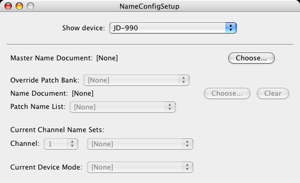
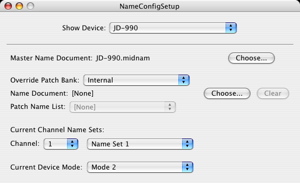
This means that MyJazzBand cannot refer to patches on that device by name yet. To enable this, click the Choose... button and choose a MIDI name document in the “open file panel” that appears. The screen shot below shows that we have chosen a file JD990.midnam which contains names of factory default patches.
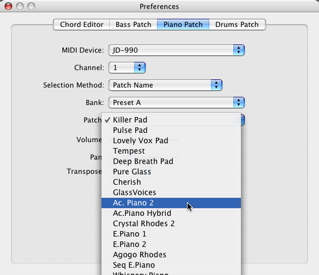
You can verify that patches can now be selected by name for this MIDI device by choosing it in the Bass Patch, Piano Patch, or Drums Patch panel in the Preferences panel. You should be able to select a bank and patch for this MIDI device by name.
[Optional, advance feature. ] CoreMIDI allows each patch bank of a master MIDI name document to be overriden by a patch bank of another MIDI name document. One way to use this mechanism is to have a patch librarian application fetch patch names by exchanging sysex messages with a MIDI device, write out the MIDI name document that represents these patch names, and override the factory default patch names with these current ones.
In the Name Config Setup panel, you can choose the banks to be overridden in the Override Patch Bank popup menu and and the overriding MIDI name document and patch name list in the Name Document text box and Patch Name List popup menu.
Previous: Selecting Patches, Up: Help Topics.