
Selecting Patches
The choice of a “patch” determines what instrument sound is played on a given MIDI channel of a given MIDI device. Patches can be selected by name when a MIDI name document has been associated with the MIDI device or by bank select and program change numbers otherwise.
See Using Name Config Setup for information on how to associate a MIDI name document with a MIDI device.
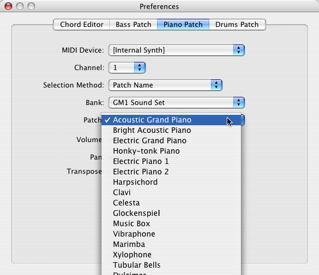
If a MIDI name document is associated with a MIDI device, patches can be selected by name. Choose “Patch Name” in the Selection Method popup menu. Then choose the bank and patch in the Bank and Patch popup menus, respectively.
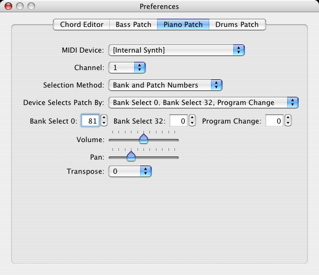
If a MIDI name document is not associated with a MIDI device, patches can be selected by numbers. Choose “Bank and Patch Numbers” in the Selection Method popup menu. A MIDI device may use any of a number of different combinations of bank selects and patch numbers to identify a patch. Consult your MIDI device's user manual to see which method it uses. Then choose the specified method in the “Device Selects Patch By:” pop-up menu. The possible choices are:
- Program Change;
- Bank Select 0, Bank Select 32, Program Change;
- Bank Select 0, Program Change;
- Bank Select 32, Program Change; or
- Program Change, Program Change.
The bank select and program change numbers can then be entered in text boxes.
Next: Using Name Config Setup, Previous: Using the Preferences Panel, Up: Help Topics.