
Playing a Song and Generating a MIDI File from a Song
To play a song after it has been entered or read in from a file, choose Song > Play, or click the Play button in the toolbar of the song document window.
The playing of the song can be stop at any time by choosing Song > Stop or clicking on the Stop button.
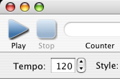
The tempo can be adjusted even while the song is being played.
To save a MIDI file containing the generated accompaniment of a song, choose Song > Generate MIDI File.... A “save panel” will appear to let you choose the location for saving the MIDI file.
The saved MIDI file can be played in a Finder window in column view by selecting it and clicking the play button in its preview panel. Alternatively it can be opened in the QuickTime Player by double-clicking its icon. It can also be imported into any MIDI sequencer for editing (see the manual of your sequencer on how to import a MIDI file).
Next: Editing Song Information, Previous: Setting the Chorus and Section Marks, Up: Help Topics.