
Setting the Chorus and Section Marks
Each song in MyJazzBand is composed of an introduction, a chorus, and an ending. The introduction consists of zero or more bars and is played once. The chorus consists of one or more bars and is played one to ten times. The ending consists of zero or more bars and is also played once.
When a song is created, the introduction and ending are empty and the chorus consists of the entire sequence of chords in the song and is played three times.
To change where the chorus begins and ends, select the bars in it and choose Edit > Set Chorus.
To set the number of times the chorus is played, choose Edit > Set Chorus Repeat > 1x, Edit > Set Chorus Repeat > 2x, ..., or Edit > Set Chorus Repeat > 10x.
For example, to set the chorus to bars 3 to 6, played five times, first select them, as shown in the following screen shot.
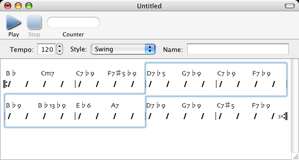
Then choose Edit > Set Chorus and Edit > Set Chorus Repeat > 5x.
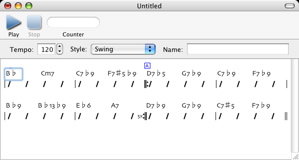
A song in MyJazzBand may also consist of a number of sections. MyJazzBand generates drum fills at the end of the sections. Section marks indicate the beginning of sections in the song document window.
To set a section mark, select one or more bars, then choose Edit > Set Section Mark > A or Edit > Set Section Mark > B. The section mark will be placed at the beginning of the selection.
For example to mark bar 3 as the beginning of an “A” section, in the second screen shot above, the third bar was selected and Edit > Set Section Mark > A is then chosen. An “A” section mark will appear above bar 3 as shown in the screen shot.
To clear a section mark, select one or more bars with the section mark that you want to clear on the first bar of the selection. Then choose Edit > Clear Section Mark.
When a song is imported from a Band-in-a-Box format file, the chorus, chorus repeats, and section marks are also imported.
Next: Playing and Generating a MIDI File from a Song, Previous: Cutting, Copying, Pasting, and Inserting Bars, Up: Help Topics.