
Cutting, Copying, Pasting, and Inserting Bars
The cut, copy, and paste commands in the chord editor behave very much like those in any other applications. They are invoked by Edit > Cut (Command-X), Edit > Copy (Command-C), and Edit > Paste (Command-V), respectively. The cut, copy, and paste commands that operate on bars will only work when one or more bars are selected. When a chord entry text box is selected, cut, copy, and paste will work on the selected characters of the chord in that text box.
The commands Edit > Insert Before Selection (Command-I) and Edit > Insert After Selection (Shift-Command-I) insert the contents of the pasteboard before and after the selected bar or bars, respectively.
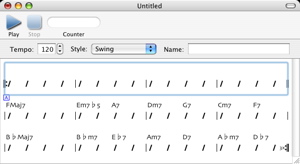
The command Edit > Insert New Bars (Shift-Command-N) creates a number of new (empty) bars before the current selection. The number of bars created is equal to the number of bars selected.
For example, to add four empty bars to the beginning of a song, select the first four bars, as follows.
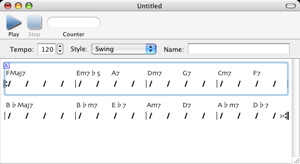
Then, choose Edit > Insert New Bars.
Next: Setting the Chorus and Section Marks, Previous: Navigating Among Chord Entry Text Boxes, Up: Help Topics.