
Using Audio MIDI Setup
The Audio MIDI Setup utility allows you to describe the MIDI devices you have connected to the MIDI interfaces that are in turn connected to your Mac. You only need to do this when you change the way devices and interfaces are connected or when you add and remove them.
You can open the Audio MIDI Setup utility from MyJazzBand by choosing MIDI > Open Audio MIDI Setup.... If a MIDI interface is connected and its driver has been installed correctly, an icon for it should appear in the MIDI Devices panel of the Audio MIDI Setup window. You then need to add the devices you have connected to the interface and draw in the cable connections. In Audio MIDI Setup, choose Help > Audio MIDI Setup Help to obtain more information on how to use it.
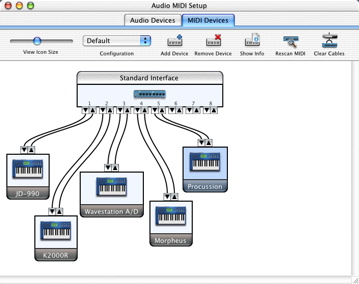
Here’s a screen shot of an audio MIDI setup window that specifies an 8-in/8-out MIDI interface connected to a number of MIDI devices.
Next: Using the Preferences Panel, Previous: Printing Lead Sheets, Up: Help Topics.