
Entering Chords in the Chord Editor
Here is the list of chords with root C that MyJazzBand recognizes:
- C, CMaj7, CMaj9, C6, C69, Csus,
- Cm, Cm7, Cm9, Cm11, Cm6, CmMaj7,
- C7, C9, C13, C7♭9, C13♭9, C7♯9, C13♯9, C7♭5, C9♭5, C7♯5, C9♯5, C7+, C9+, C7♯5♯9, C7♭5♭9, C7♯5♭9, C7♭5♯9, C7sus, C9sus, C7♯11, C9♯11,
- Cm7♭5, Cdim, C+, Caug
The MyJazzBand chord editor supports text completion and input validation to let you enter chords quickly and accurately.
When text completion is invoked MyJazzBand shows you all the valid endings that may following the current input. Any time after the root of the chord has been typed, you can hit F5 (function key 5) or Option-Escape to see what the possible completions are. For example, hitting F5 after typing the root C will show all the possible C chords listed above. Hitting F5 after typing C9 will show C9, C9♭5, C9♯5, C9+, C9sus, and C9♯11. These are all chords beginning with C9 that MyJazzBand recognizes.
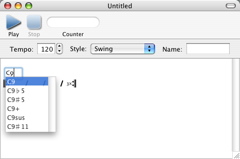
The chord editor performs input validation as you type so it is impossible to enter an invalid chord! An alert sound is played whenever an invalid key is typed.
The chord editor automatically capitalizes as you type. So to enter DmMaj7, you only need to type dmmaj7. Of course you can also enter the capitalization yourself.
The chord editor also automatically converts '#' (hash mark) to '♯' and 'b' (lowercase letter b) to '♭' at appropriate places. Therefore to enter B♭7♯5, you only need to type bb7#5.
You can also use “slash chords” to specify a bass note that is different from the root of a chord. For example, Fm7/B♭ denotes the Fm7 chord with a B♭ bass note.
Next: Navigating Among Chords Entry Text Boxes, Previous: Using the Chord Editor, Up: Help Topics.