MIDI Programs
MIDI File Player (External Device)
MIDI Destination Pop-Up Button
Other Programs
Cocoa Sample Programs
Syntax Coloring Using Flex
Algorithms
Jazz Chord Analysis as Optimization
A blog where I will write mostly about programming in Cocoa and CoreMIDI, and experiences from my ports of Emacs and XEmacs to the Mac OS.
| OS X Chinese IM Plugin Converter! |
Yesterday's exercise on handling Big-5 files was a prelude to today's tool Q2AIM: one that generates an input file for OS X's IM Plugin Converter from a Emacs/Quail input method. This tool makes all Emacs Big-5 input methods available to any application on OS X!
Currently I have only tested it on jyut6-ping3.el, which I described how to generate on Wednesday's message. Since this file is in iso-2022-7bit coding, we must first convert it to big5 coding by running the following command.
Then drop the fileemacs --batch --eval="(progn (find-file \\"jyut6-ping3.el\\")\\
(search-forward \\"-*- coding:iso-2022-7bit; -*-\\")\\
(replace-match \\"-*- coding:big5; -*-\\")\\
(set-buffer-file-coding-system 'big5)\\
(write-file \\"jyut6-ping3-b5.el\\"))"
jyut6-ping3-b5.el onto Q2AIM to generate jyut6-ping3-b5, which is then dropped onto IM Plugin Converter, which is found in /Applications/Utilities/Asia Text Extras/. Then put the generated file jyut6-ping3-b5.dat in ~/Library/ChineseInputMethodPlug-in. That's it!There are still some glitches with punctuation marks and it will require a little work to make the program work for other Quail files and other encodings. But the basic mechanisms are all there.
After working on this program, I must say I prefer C++'s strings a lot over NSString. The services provided by NSScanner are really rudimentary! Unfortunately
wstring and friends aren't supported on gcc 3.3 on OS X and can't be used. Oh well.
| More Plants, More Plants! |
Just a picture of the larkspurs I planted last week:

and one of a clematis integrifolia Durandii I planted today:

I actually planted it twice: I planted it, then found out it did go in deep enough and had to dig it out :-).
I also investigated how one might write some code on OS X to process files in Chinese Big-5 encoding. After many detours, I found NSString instance methods initWithData:encoding:, dataUsingEncoding:, and friends. The following program converts Big-5 file input to UTF-8 and then converts it back to Big-5 and writes it to the file output. It's also nice to find that both conversions are non-lossy.
#import <Foundation/Foundation.h>


int main (int argc, const char * argv[]) {

    NSAutoreleasePool * pool = [[NSAutoreleasePool alloc] init];


    UInt32 big5 = CFStringConvertEncodingToNSStringEncoding(kCFStringEncodingMacChineseTrad);


    NSData *data = [NSData dataWithContentsOfFile:@"input"];

    NSString *fileContents = [[NSString alloc] initWithData:data encoding:big5];


    // Uncomment the next line to see UTF-8 code.

    // printf("%s", [fileContents UTF8String]);


    NSData *converted = [fileContents dataUsingEncoding:big5];

    [converted writeToFile:@"output" atomically:YES];


    [pool release];

    return 0;

}
| My Personalized Cantonese Input Method for Emacs |
Every one has a different idea of how Chinese should be input to the computer. Because it is so easy to «invent» them, there are literally hundreds of Chinese input methods to choose from.
Typing phonetically is most natural for me because I find it difficult to compose a message and at the same time think about how the characters should be written. I need to type in Cantonese because that's my native Chinese dialect.
Even when this has been decided, there exist Cantonese input methods corresponding to different romanizations. Wouldn't it be nice if the input method romanizes exactly in the most natural way for me? That's why I wrote a Emacs Lisp program for generating a Emacs input method for which you can customize the romanization. It also puts more frequently used characters earlier in the selection lists according to a frequency table.
To generate your own input method, grab my program
jyut6-ping3-convert.el. Then
get
this file and
this
other file. The latter is zipped so you need to unzip it. Put
all three files in the same directory.
Open jyut6-ping3-convert.el in Emacs 21.
Choose Evaluate Buffer from the Emacs-Lisp
menu. Then type M-x gen-dict-do-it RET.
After a short time the file jyut6-ping3.el will be
generated. Byte-compile it (optional). Put the result anywhere
(say ~/Library/Emacs) and add the following to
your .emacs file.
(setq load-path (cons "~/Library/Emacs" load-path))(register-input-method "chinese-jp" "Chinese-BIG5" 'quail-use-package "粵拼" "中文輸入【粵拼】BIG5" "jyut6-ping3")
Then the input method chinese-jp becomes available.
To customize the romanization, edit the definitions of
jp2ct-consonant-translation-table
and jp2ct-vowel-translation-table at the beginning
of jyut6-ping3-convert.el and repeat the steps above.
Pretty neat huh?
Note that unlike the other programs I've posted (which are in Perl Artistic License), this one is under GPL. Why? Well, it's a Emacs thing.
| DropTar |
Why do I write programs? Because I feel the need to, like writers need to write, like musicians need to compose. When I create beautiful programs, I feel fulfilled; I feel a little closer to Perfection. If I sound fanatic, I probably am. I told the door-to-door evangelists about “beautiful programs” when they ask me what my beliefs are. I think I scared them a little :-).
Anyway, enough with scary stuffs. I wrote a wrapper for the tar program this morning. To use it, drag-and-drop a folder (such as the DropTar PB project folder) on its application icon and it creates a gzipped tarball (DropTar.tgz) for you.
I was looking at various Mac sites, and the second most popular download at ZDnet last week was MacZIP. The second most popular total download was ZipIt. Considering that one of these programs is a $20 shareware and the other doesn't seem to run on OS X, Mac users must have a lot of files to zip and unzip! Of course if they're willing to use the command-line, they can always used the free program Info-ZIP. Unzip-5.50 builds nicely on OS X with the command make -f unix/Makefile macosx and zip-2.3 with make -f unix/Makefile generic. It should then be quite easy to change DropTar to run zip instead of tar.
| Postscript Viewer |
My iris order arrived on Saturday. So I spent a bit of time sorting them out and looking up their colors and sizes again so I can decide where to put them.
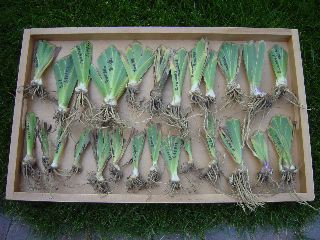
I should plant them soon so they can have more time to take root before winter comes. I planted some irises last year and they bloomed very nicely in spring. My favorite are these standard dwarf bearded ones called chubby cheeks:

Well, let's talk programming. In between playing with iris rhizomes, I wrote this postscript file viewer (also with Perl Artistic License). It was really quite easy because PSViewer calls Ghostscript to convert a postscript file into PDF, which is a native format of AppKit. The sample program PDFView helps a little, although it needs to be changed into a document-based application and scrolling needs to be added. This post and this other post on macosx-dev show how to display second and subsequent pages correctly. Then I added scaling, using an idea from this O'Reilly tutorial.
The lesson is this: Google (both web and group searches) is a programmer's friend. In the course of porting Emacs, I have never found the need to post anywhere or E-mail anyone to ask questions, except once. The one time I did post to macosx-dev, no one gave the right answer anyway :-). So if you can't find it with Google, you'd probably be better off figuring it out yourself.
| Sun | Mon | Tue | Wed | Thu | Fri | Sat | |
| 1 | 2 | ||||||
| 3 | 4 | 5 | 6 | 7 | 8 | 9 | |
| 10 | 11 | 12 | 13 | 14 | 15 | 16 | |
| 17 | 18 | 19 | 20 | 21 | 22 | 23 | • |
| 24 | 25 | 26 | 27 | 28 | 29 | 30 | ← |
| 31 | • | ||||||
| Jul Sep |


Lists
Less-Known Facts About Emacs
Chinese Restaurants in Calgary
Calgary/Banff Tourist Attractions
Top-10 Reason I Stopped Working on Emacs
Misc