MIDI Programs
MIDI File Player (External Device)
MIDI Destination Pop-Up Button
Other Programs
Cocoa Sample Programs
Syntax Coloring Using Flex
Algorithms
Jazz Chord Analysis as Optimization
A blog where I will write mostly about programming in Cocoa and CoreMIDI, and experiences from my ports of Emacs and XEmacs to the Mac OS.
| Naming and Addressing MIDI Devices |
The way MIDI devices were named and addressed was probably one of the least Macintosh-like aspects of MIDI applications that ran on Mac OS Classic until extensions like OMS and FreeMIDI, and applications that used them, established de facto standards for such operations. Even then, the “Macintosh-ness” of these applications leaves something to be desired because each tried to do things its own way. But those were the days of complicated MIDI studio setups with device chains using “MIDI Thru” ports and “MIDI patchers”.
Unique ID’s (type MIDIUniqueID) in CoreMIDI are a carry-over from OMS. They provide persistent references to endpoints. The latter can be thought of as “ports” to and from which MIDI packets are sent and received. Unique ID’s are to MIDI endpoints like (Carbon) aliases are to files, and allow the referenced objects to be located even after being renamed or moved. They also provide a means for MIDI applications to distinguish among a number of identical devices (interfaces) and external devices (synths) present in the same studio setup. All is well when these persistent unqiue ID’s work perfectly; things become quite messy when objects referred to by them no longer exist in the system. The application must then revert to searching through interconnecting interfaces and devices using string names. CoreMIDI doesn’t provide a means to conduct this search nor does its documentation recommend a standard way of doing so. Applications each doing this its own way will no doubt result in a very un-Macintosh-like user experience. But Mac users are quite used to paying a lot of money for MIDI applications and not expecting more I guess :-).
To me, the unique ID scheme is a terrible design: it solves the problem “backward” by taking exceptional occurrences and making mechanisms for handling them the prominent features of a programming interface! I will argue below that addressing external devices using their manufacturer and model names and (system exclusive) device ID’s provides a much more user-friendly experience to both users and programmers.
Consider how a user views his MIDI setup. A number of synthesizers are connected via MIDI interfaces to the computer and he needs a way to specify which synthesizer notes are sent to and received from. When he connects the synthesizers and interfaces to the computer for the first time, or whenever he reconnects them, he’ll use Audio/MIDI Setup to specify this interconnection. This information allows CoreMIDI to determine which drivers to call to sent and received MIDI packets to and from particular synthesizers. Once the setup information has been entered, however, the user only really cares about naming and addressing the synthesizers rather than the interfaces and interconnections. That’s why the manufacturer and model names of the synthesizers are the most user-friendly way to specify them. When identical synthesizers are present, different system exclusive device ID’s can be used to distinguish them.
Now let’s dispell some of the myths of the “advantages” of unique ID’s.
- Unique ID’s allow an application to distinguish two instances of the same model of MIDI interface. The user only cares about addressing synthesizers, rather than interfaces, as long as endpoints returned by the MIDI system correctly direct MIDI packets to them.
- Unique ID’s allow an application to distinguish two instances of the same model synthesizer. In this case, one’ll need some means of distinguishing the two instances anyway. System exclusive device ID’s serves the purpose better than the signal routes (e.g., synth 1 is connected to port 3 of device 1 and synth 2 is connected to port 4 of device 2), which must be used with unqiue ID’s. When the MIDI setup is changed or when the application and data files are run on another computer, addressing by unique ID’s will fail while addressing by system exclusive device ID will continue to work.
- Unique ID’s tolerate renaming. You may decide to nickname your DX7-II “George” or “Betsy” but it’ll still be a DX7-II. It’s a nice feature to allow users to name their synthesizers but the manufacturer and model names should also be stored. Addressing by manufacturer and model names will obviously work correctly when user names are changed.
It’ll be a nice exercise to design a MIDI programming API with the principles described above to run on top of CoreMIDI. I’ll probably take this on after the completion of my automatic accompaniment program. In the mean time, the sample program I posted yesterday shows the programming necessary to use unique ID’s and provides a reference implementation for searching by string names when unique ID’s fail.
| MIDI Endpoint Popup Button |
How much work is it to write some code to display a popup button for choosing among the MIDI destination (or source) endpoints? Not a lot, but the coding can get a little tricky, apparently, if you want to do it right! A sample program I’ve written will demonstrate the many details that need to be considered.
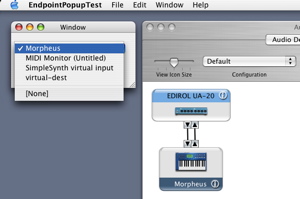
Of course the popup button updates itself automatically to reflect any MIDI setup changes, or when virtual instruments are added and deleted. The selected endpoint is also updated to a reasonable value. Also, the selected endpoint is saved in a preference file and is remembered across different invocations of the sample program. A nice trick in the program allows the selection to be handled correctly when a device is removed (e.g., when a virtual instrument quits) and later added back. The selection will be set to “[None]” while the device is absent and will revert back to that device when it appears again.
| Sun | Mon | Tue | Wed | Thu | Fri | Sat | |
| 1 | 2 | 3 | 4 | 5 | 6 | 7 | |
| 8 | 9 | 10 | 11 | 12 | 13 | 14 | |
| 15 | 16 | 17 | 18 | 19 | 20 | 21 | • |
| 22 | 23 | 24 | 25 | 26 | 27 | 28 | • |
| 29 | 30 | 31 | ← | ||||
| Sun | Mon | Tue | Wed | Thu | Fri | Sat | |
| 1 | 2 | 3 | 4 | ← | |||
| 5 | 6 | 7 | 8 | 9 | 10 | 11 | • |
| 12 | 13 | 14 | 15 | 16 | 17 | 18 | • |
| 19 | 20 | 21 | 22 | 23 | 24 | 25 | • |
| 26 | 27 | 28 | 29 | 30 | • | ||
| Jul Oct |


Lists
Less-Known Facts About Emacs
Chinese Restaurants in Calgary
Calgary/Banff Tourist Attractions
Top-10 Reason I Stopped Working on Emacs
Misc