MIDI Programs
MIDI File Player (External Device)
MIDI Destination Pop-Up Button
Other Programs
Cocoa Sample Programs
Syntax Coloring Using Flex
Algorithms
Jazz Chord Analysis as Optimization
A blog where I will write mostly about programming in Cocoa and CoreMIDI, and experiences from my ports of Emacs and XEmacs to the Mac OS.
| Multiple Bar Selections |
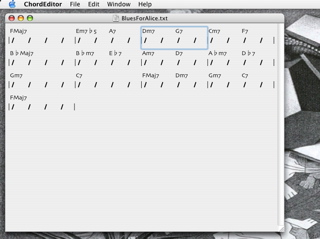
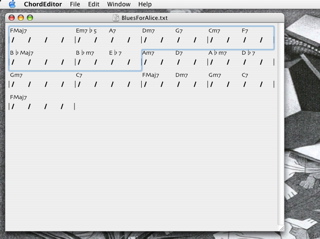
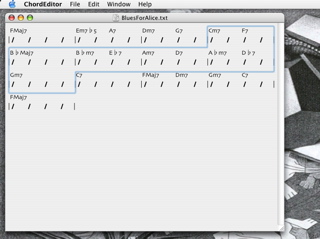
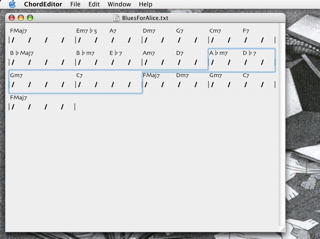
I wrote some code to handle selection of one of more bars in the chord editor. To select a bar, click anywhere on its notation (the slashes). Clicking on one of the chord names will of course select the chord for editing.
| NSUndoManager |
The Cocoa undo manager turns out not to be too difficult to learn. I skimmed its documentation, then the articles whose links I posted yesterday, and then I carefully read its documentation from beginning to end. The problem with articles on the Web is sometimes their authors can be too fixated on their solutions of specialized problems. The quality and generality of these “solutions” can also be questionable sometimes.
I went back to work on the FCBlogEditor (described earlier here, and later improved) to make it support undo and redo. Although it uses an NSTextView object for editing, changes to text through calls to its corresponding NSTextStorage object must be bracketed by
  [textView shouldChangeTextInRange:... replacementString:...];
  [[textView textStorage] replaceCharactersInRange:... withString:...];
  [textView didChangeText];
for undo and redo to work correctly. Here’s a new version of FCBlogEditor that includes this and other small changes I have made since it was last posted.
There is also a well-known problem with using
NSTextField with the undo manager (see this article, for example). Basically it doesn’t work as expected if one simply calls setAllowUndo:YES for its field editor. I’ve written some sample code that implements undo/redo for text fields. It assumes that the unit of undo/redo is the combined changes made to a text field between the times it becomes and resigns as first responder.
| NSFormatter SubClass for Chord Entry |
I implemented an NSFormatter subclass for chord entry today. With it, only valid chords can be entered into the text fields. Combined with text completion, and navigation using arrow keys, a chord chart can be entered very quickly. For example the first eight bars of A Night in Tunisia can be entered by typing:
eb7 Cmd-→
dm6 Cmd-→
eb7 Cmd-→
dm6 Cmd-→
eb7 Cmd-→
dm6 Cmd-→
em7b5 Opt-→
a7b5 F5 ↓ Opt-→
dm6 Cmd-→
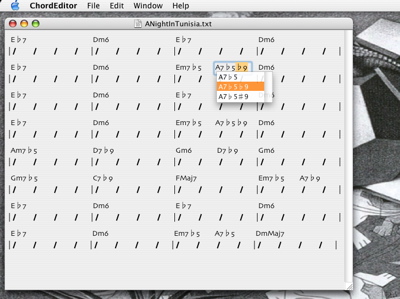
fmaj7 and dmmaj7 and the formatter will automatically capitalize them correctly for you.My next step is to implement cut, copy, and paste using the mouse. I’ll be using a bar as the smallest unit on which the program will operate. This is similar to Finale’s mass mover and mass edit tools. First I have to learn about the
NSUndoManager. I’ve found an article on MacEdition and another article on this topic. I’ll read them and report back soon.
| Navigation Using the Keyboard in Chord Editor |
I wrote some code to allow the user to navigate within a chord chart in the chord editor using the arrow keys. The left and right arrow keys move to the previous and next beats, respectively. So do the tab and shift-tab keys (to be consistent with Cocoa’s selection of text fields). Option left and right arrow keys move to the next half note. Command left and right arrow keys move to the beginning of the previous and next bar, respectively.
The up and down arrow keys move to the previous and next lines. They are interesting to implement because like a word processor with variable width fonts, the horizontal position where the downward or upward movement begins is recorded and each new position is chosen to be as close to that position horizontally as possible.
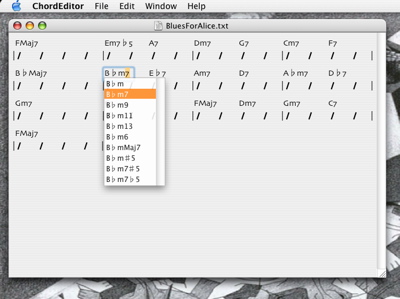
It was quite simple to put the text completion code into the Chord Editor. Here’s a screenshot of the result.
| Sun | Mon | Tue | Wed | Thu | Fri | Sat | |
| 1 | 2 | 3 | • | ||||
| 4 | 5 | 6 | 7 | 8 | 9 | 10 | • |
| 11 | 12 | 13 | 14 | 15 | 16 | 17 | • |
| 18 | 19 | 20 | 21 | 22 | 23 | 24 | • |
| 25 | 26 | 27 | 28 | 29 | 30 | ← | |
| Sun | Mon | Tue | Wed | Thu | Fri | Sat | |
| 1 | ← | ||||||
| 2 | 3 | 4 | 5 | 6 | 7 | 8 | • |
| 9 | 10 | 11 | 12 | 13 | 14 | 15 | • |
| 16 | 17 | 18 | 19 | 20 | 21 | 22 | • |
| 23 | 24 | 25 | 26 | 27 | 28 | 29 | • |
| 30 | 31 | • | |||||
| Mar Jul |


Lists
Less-Known Facts About Emacs
Chinese Restaurants in Calgary
Calgary/Banff Tourist Attractions
Top-10 Reason I Stopped Working on Emacs
Misc