MIDI Programs
MIDI File Player (External Device)
MIDI Destination Pop-Up Button
Other Programs
Cocoa Sample Programs
Syntax Coloring Using Flex
Algorithms
Jazz Chord Analysis as Optimization
A blog where I will write mostly about programming in Cocoa and CoreMIDI, and experiences from my ports of Emacs and XEmacs to the Mac OS.
| Text Format Chord Chart Input/Output |
Converted the C++ code I wrote earlier for reading and writing chord charts in text format into Objective C/Cocoa. At some point, I’ll need to integrate the C++ “jazz theory classes” and accompaniment generation algorithms with the Objective C/Cocoa GUI code. But I’d like file I/O to be done in Objective C/Cocoa. The BiaB file reader will be converted next.
It’s great that I can now read (and edit!) all the files I created before. Here’s an example.
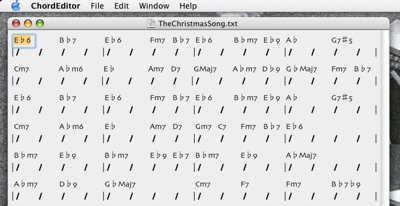
Title: The Christmas Song
Meter: 4/4
Key: Eb
Tempo: 120
| Eb6 Bb7 | Eb6 _ Fm7 Bb7 | Eb6 _ Bbm7 Eb9 | Ab G7#5 |
| Cm7 Abm6 | Eb _ Am7 D7 | GMaj7 _ Abm7 Db9 | GbMaj7 _ Fm7 Bb7 |
| Eb6 Bb7 | Eb6 _ Fm7 Bb7 | Eb6 _ Bbm7 Eb9 | Ab G7#5 |
| Cm7 Abm6 | Eb _ Am7 D7 | Gm7 C7 Fm7 Bb7 | Eb6 |
| Bbm7 Eb9 | Bbm7 _ Eb9 Eb7 | Bbm7 Eb9 | AbMaj7 |
| Abm7 Db9 | GbMaj7 | Cm7 F7 | Fm7 Bb7b9 |
...
| Slash Chords, 3/4 Time |
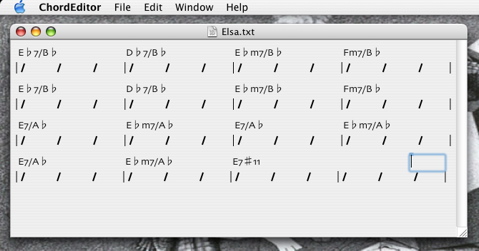
Added code to my NSFormatter subclass to handle “slash chords”. Here’s the new code in action for the beginning of a tune in 3/4 time. The code has been written to handle different time signatures all along. But this is the first time I’ve tried it.
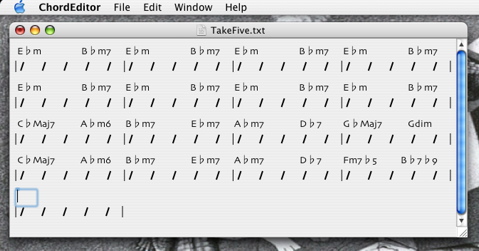
While we’re demonstrating the use of the chord editor for tunes with odd time signatures, how can we not show one of Take Five? Here’re its first few bars. Let’s see BiaB or MiBAC Jazz do that :-)!
| Automatically Creating Bars in the Chord Editor |
One thing I don’t like about the chord editors in BiaB and MiBAC Jazz is that the length of a chorus is specified separately from the the entry of the chords. This is of course redundant because this length can be deduced from the number of bars of chords you enter. In addition to prettier layouts, this is another advantage of designing a chord editor to behave “more like a word processor”.
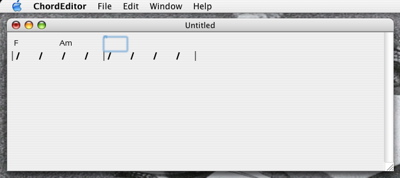
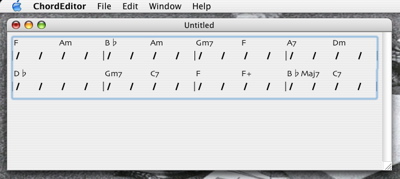
My chord editor is almost complete, with all the features I wrote about last week (input verification using a formatter and automatic completion) and now with cut, copy, and paste, and unlimited undo’s and redo’s. Whenever we try to move beyond the last bar using tab, right arrow, option right arrow, or command right arrow, a new bar is automatically appended. This is quite a nice design since one can just start and continue typing the chords without worrying about how long the chart will be!
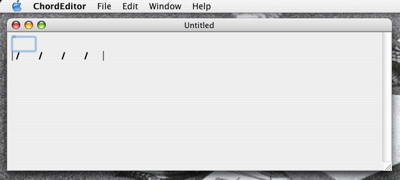
Here’s what a document window looks like when a new document is just created.
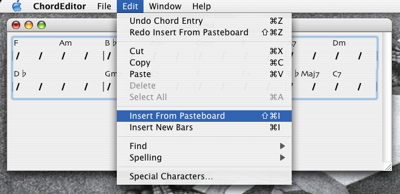
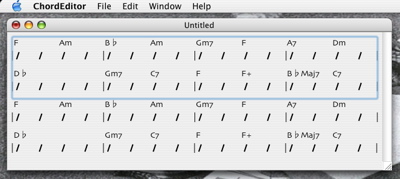
| Undo, Pasteboard, etc. |
The Cocoa undo manager is such a pleasure to use! Implementing undo’s and redo’s in an application has never been easier. Basically in each routine that implements an operation that can be undone, you register with the undo manager a routine and the parameters to undo that operation. In this “undo” routine (when and if it is executed) you register with the undo manager a routine and the parameters to redo that undo. The beauty of the design is: the routine used for undo and redo can usually be the same one.
Let me illustrate with an actual routine in my code. The method replaceInRangeWithUndo:withBars: replaces a number of bars in the current chord chart with a number of bars passed as parameters.
- (void)replaceInRangeWithUndo:(NSRange)range withBars:(NSArray *)bars
{
  // Get the contents of the bars that will be replaced.
  NSArray *originalBars = [self barsInRange:range];
  // Compute the range the new bars will occupy.
  NSRange newRange = NSMakeRange(range.location, [bars count]);

  NSUndoManager *undoManager = ...
  [[undoManager prepareWithInvocationTarget:self]
     replaceInRangeWithUndo:newRange withBars:originalBars];

  // Do the actual replacing.
  [self replaceInRange:range withBars:bars];
}
This is what the code says: to undo a replaceInRangeWithUndo:withBars: operation, replace the range occupied by the new bars with the original bars. Notice that this routine is used for redo as well. I.e., to redo a replaceInRangeWithUndo:withBars:, replace the original bars (again) with the new bars. That’s all you need to write, and that’s also the beauty of this undo/redo mechanism.
| Sun | Mon | Tue | Wed | Thu | Fri | Sat | |
| 1 | • | ||||||
| 2 | 3 | 4 | 5 | 6 | 7 | 8 | ← |
| 9 | 10 | 11 | 12 | 13 | 14 | 15 | • |
| 16 | 17 | 18 | 19 | 20 | 21 | 22 | • |
| 23 | 24 | 25 | 26 | 27 | 28 | 29 | • |
| 30 | 31 | • | |||||
| Apr Jul |


Lists
Less-Known Facts About Emacs
Chinese Restaurants in Calgary
Calgary/Banff Tourist Attractions
Top-10 Reason I Stopped Working on Emacs
Misc