MIDI Programs
MIDI File Player (External Device)
MIDI Destination Pop-Up Button
Other Programs
Cocoa Sample Programs
Syntax Coloring Using Flex
Algorithms
Jazz Chord Analysis as Optimization
A blog where I will write mostly about programming in Cocoa and CoreMIDI, and experiences from my ports of Emacs and XEmacs to the Mac OS.
| How Not to Lose Uncommitted Text Field Edits |
When characters are typed in a text field in a Cocoa application, before the tab or return key is hit, the characters are still considered “uncommitted”. For instance, if the document window is closed at this time, the user isn’t given a chance to save the document! Try creating a new message in Mail.app, type something in the “To:” text field, and close the message window. The window closes and you lose whatever you have typed! To me this really isn’t intuitive GUI behavior. I searched the Cocoa Builder archive and found a number of messages with different opinions on how this might be fixed but none that really knew how to do it.
I wrote a sample application to solve this problem. The solution is really simple: I keep track of whether a text field commit is pending, i.e., after the delegate method controlTextDidBeginEditing: is called but before the corresponding controlTextDidEndEditing: is called. Then all one needs to do is override NSDocument’s isDocumentEdited to return either the super class’s isDocumentEdited or a text field commit is pending. It’s so simple that no one thought of it :-)! What can I say?
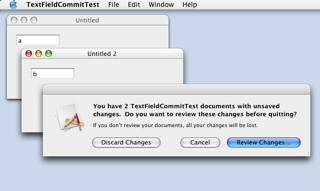
Here’s a screen shot of the sample application in action. The text fields in the two documents contain characters that were typed but not committed. “Quit” was selected at this time, which results in the dialog for giving the user a chance to review the two changed documents.
| Overriding NSDocument Methods |
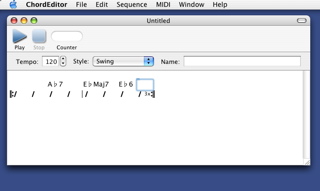
A chord chart is considered invalid if no chord is entered for the first beat of the first bar because we wouldn’t know what chord to play for the first few beats. In the following example, no chord is specified for the first two beats of the song. The chord editor will report an error when it reads such a chord chart in text format. Therefore it must not save such a chord chart either.
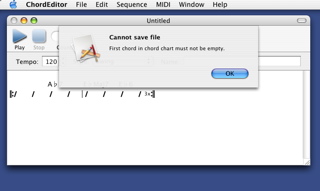
saveDocument: and saveDocumentAs: in my NSDocument subclass. Here’s a screen shot of the alert sheet that appears when the user tries to save the document.
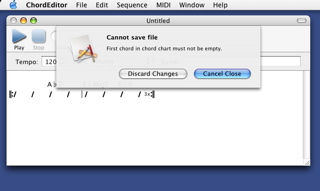
canCloseDocumentWithDelegate:shouldCloseSelector:contextInfo:. Here’s a screen shot of that alert sheet.
| Effects of Bar Insertion and Deletion on Chorus End Points |
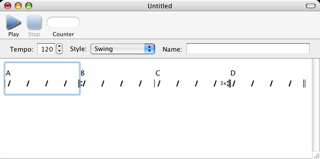
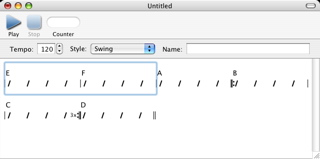
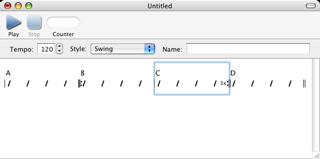
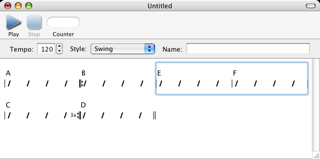
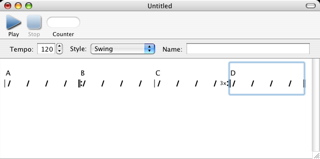
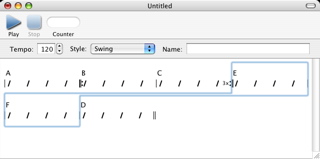
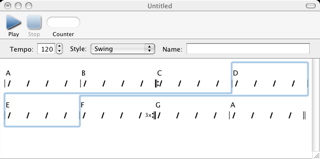
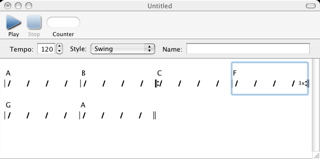
If you examine other MIDI applications that contain a chord editor, you’ll find that the bars where the chorus begins and ends aren’t affected when bars are inserted into and deleted from the chord chart in them. This makes the GUI quite unintuitive especially when these end points end up lying beyond the end of the chord chart as a result of a deletion!
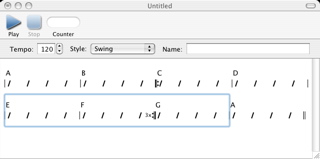
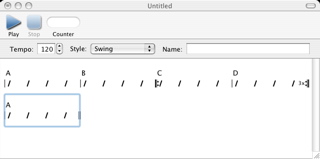
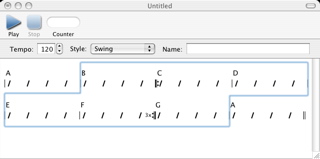
I spent some time today on implementing smart adjustment of the chorus end points after bar insertions and deletions. Well, it’s not as easy as it sounds!
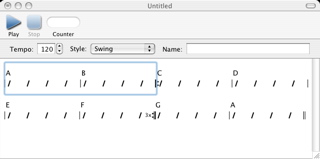
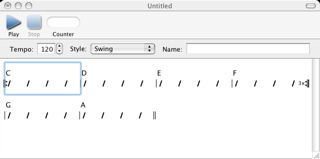
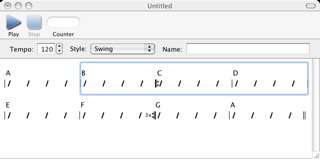
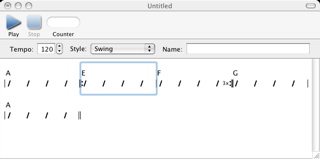
Insertions are easier so let me show you some examples. Here’s one of a chord chart with four bars where the chorus consists of bars 2 and 3.
| Cut, Copy, Paste, and Other Operations on Bars |
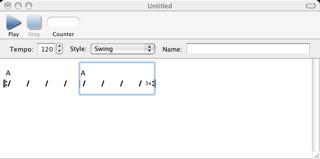
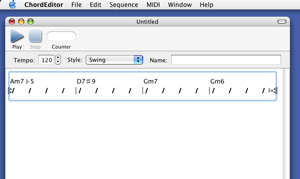
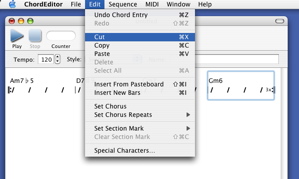
Back when I was thinking about how the chord editor should work, I made a design decision regarding how bars should be selected and how the selections should appear in the GUI. Editing bars are really very much like editing characters, in that sometimes a sequence of them are selected but yet at other times we’d like to place the “cursor” between two consecutive bars. On the other hand, visually they look more like the cells in a spreadsheet (albeit in one-dimension). Because of this, and to avoid the confusion to the user of switching between a selection and a cursor, I decided against implementing a cursor that goes between bars and always have a selection that contains at least one bar. This makes the programming a little more complicated because special cases need to be handled separately. Consider a document containing four bars, all of them selected.
| Representing and Editing Sections |
I took quite a simple approach to store sections and section marks in a tune. The following sample progression:
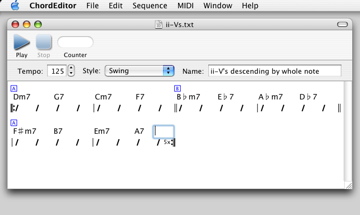
Name: ii-V's descending by whole note
Meter: 4/4
Key: C
Tempo: 125
Chorus: bars 1 to 6 (repeat 5 times)
Sections: 1A 3B 5A
| Dm7 G7 | Cm7 F7 | Bbm7 Eb7 | Abm7 Db7 |
| F#m7 B7 | Em7 A7 |
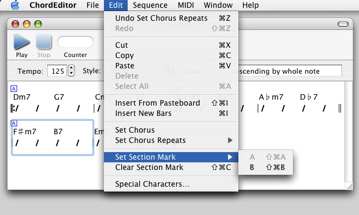
Editing the section marks is also simple: when a bar is selected, the appropriate menu items are enabled to allow the user to set the section mark to “A” and “B”, and to clear it. In the following example bar 5 with the section mark “A” is selected. So the user can either set it to “B” or clear it.
| Sun | Mon | Tue | Wed | Thu | Fri | Sat | |
| 1 | 2 | • | |||||
| 3 | 4 | 5 | 6 | 7 | 8 | 9 | • |
| 10 | 11 | 12 | 13 | 14 | 15 | 16 | ← |
| 17 | 18 | 19 | 20 | 21 | 22 | 23 | • |
| 24 | 25 | 26 | 27 | 28 | 29 | 30 | • |
| 31 | • | ||||||
| Sep Nov |


Lists
Less-Known Facts About Emacs
Chinese Restaurants in Calgary
Calgary/Banff Tourist Attractions
Top-10 Reason I Stopped Working on Emacs
Misc