MIDI Programs
MIDI File Player (External Device)
MIDI Destination Pop-Up Button
Other Programs
Cocoa Sample Programs
Syntax Coloring Using Flex
Algorithms
Jazz Chord Analysis as Optimization
A blog where I will write mostly about programming in Cocoa and CoreMIDI, and experiences from my ports of Emacs and XEmacs to the Mac OS.
| NSToolbar! |
I’d like to put “Play” and “Stop” buttons at the top of each document window so the user can easily play the generated accompaniment. I’ll also need a measure and beat counter somewhere. It turns out, after studying a number of Apple applications and reading the Human Interface Guide, that these are probably best implemented as items in a toolbar. So I wrote a little sample program to see how this may work.
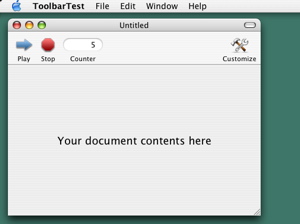
NSToolbar is to read the Cocoa documentation and study the sample code /Developer/Examples/AppKit/SimpleToolbar. A tutorial at the O’Reilly website helps too. The icons in the sample program comes from the Scotland Software website. I resized and edited them in Gimp. Anyway I’ll design and create my own icons for use in my final products. For now I can apparently include these icons in the sample code if I acknowledge their creators.
| Highlighting Current Measure, Cont’d. |
It took a little more programming to get the code for highlighting the current measure during playback of the generated accompaniment sequences to work correctly. One needs to call the drawRect: and display methods of NSView just at the right moments. Scrolling the view automatically so that the current measure is always visible as the sequence plays also required a little experimentation to implement correctly. I’ve also made all objects in the view unselectable and uneditable so editing cannot take place during playback.
I’ve also studied the problem of handling errors and exceptions in Cocoa applications. There doesn’t seem to be any good sample code for this. Cocoa provides a rudimentary exception handling mechanism (NSException) which is integrated into some classes better than others (not in the document-based application framework, e.g.). Fortunately features like formatters and text completion greatly reduce error conditions. The placement of exception handlers at “top-level” methods such as those implementing menu actions seems sufficient for now. We shall see.
| Highlighting Current Measure |
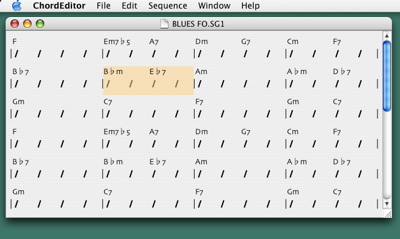
I wrote some code to highlight the current measure as my program plays back the generated accompaniment. Didn’t want too many objects prancing across the window. So I settled on just highlighting the current measure. Performance will also be a problem if the GUI needs to be updated too frequently. DrawRect will then need to be re-coded to make use of the update rectangle. Anyway I’ll add ticking repeat, measure, and beat counters somewhere. Oh, the view also scrolls automatically when playback reaches the bottom of the window.
| Visual Feedback for MIDI Sequence Playback |
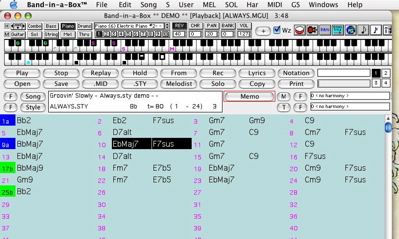
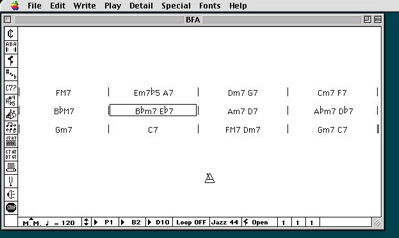
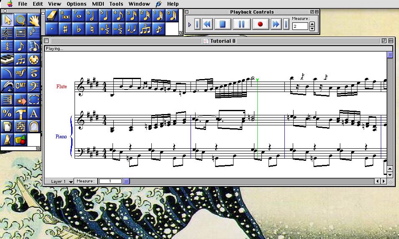
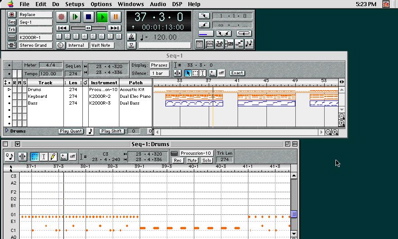
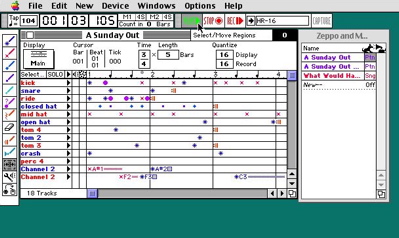
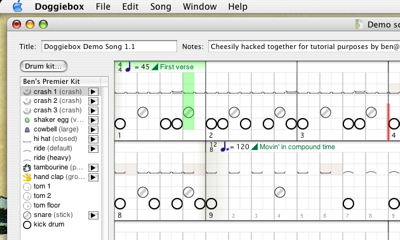
I spent a little time today studying how different MIDI programs provide visual feedback when sequences are being played. Band in a Box highlights the bar being played in reversed video. It switches to another page of the chord chart when playback reaches the bottom of the view.
| A New Beginning (?) |
I’m back writing programs again. The vacation lasted longer than planned. I visited my aunts and uncles in San Francisco in June. Then my sister’s and my cousin’s families came to see me here in Calgary. There were a lot of sightseeing, shopping, barbecues, and Chinese food. Everyone had a wonderful time. Here’s a flock of big-horn sheep we ran into at the top of Sulphur Mountain in Banff. Neat, huh?

So this blog is mostly just my personal log. I’m not trying to sell anyone anything, promote any isms, voice my opinions, etc. You’ve got the rest of the Internet for that kind of content :-)! My only “real job” had been in teaching so if you accidentally learn something from my sample programs, I wouldn’t mind very much :-). I also love designing and writing programs so if I can spread some of this excitement around, that would be very nice too!
Probably because of my Emacs port, people think I advocate free software. And I sometimes receive requests for source code for my programs and libraries I’ve described in the blog. To explain my thoughts on software (free or otherwise) will take quite a bit of time. Suffice it to say I ported Emacs to the Mac just for the fun of it! In any case I’ve been developing the MIDI programs as commercial products and plan on selling them. So the source code I’ve posted and will be posting is already what I’m happy with giving away. Note that all the sample code is released under the Perl Artistic License and not the GPL. This is the tiny political statement that I’m making, for those who understand software licenses.
Enough of that. Let’s talk about programming. I posted this tiny MIDI file player that demonstrates the use of
MusicPlayer and MusicSequence to play MIDI files. In a real MIDI program, however, we need visual feedback when the sequence is being played: a ticking counter, a moving “wiper cursor”, whatever. How should we structure such a program? At first glance this seems to be a very simple problem. Create a recurring timer and update the counter or cursor when it fires. But when we consider the following questions, the problem becomes a bit more involved.- Can the updates be made to occur exactly on the beat?
- Will tempo changes in a song be handled correctly?
- What should we do when the timer is not fired on time (due to multiprogramming on Mac OS X)?
- Can we also provide visual feedback when a sequence has finished playing (e.g., enable the play button again)?
NSTimer that fires at the time of the next beat. It handles tempo changes correctly by obtaining the time of the next beat by calling MusicPlayerGetHostTimeForBeats. If the firing of the timer runs behind (this can be demonstrated by resizing the document window), the program “catches up” by skipping the missed beats. In addition to a “beat count” callback function, the design also provides a callback function that is invoked when the sequence finishes playing.The coding is also made a little more difficult by a bug (arbitrarily imposed restriction?) in
MusicPlayerGetHostTimeForBeats and the need to properly cancel and dispose of pending timers under all circumstances. Anyway the code is there for all to scrutinize.
| Sun | Mon | Tue | Wed | Thu | Fri | Sat | |
| 1 | 2 | 3 | 4 | 5 | 6 | 7 | |
| 8 | 9 | 10 | 11 | 12 | 13 | 14 | |
| 15 | 16 | 17 | 18 | 19 | 20 | 21 | ← |
| 22 | 23 | 24 | 25 | 26 | 27 | 28 | • |
| 29 | 30 | 31 | • | ||||
| Jul Sep |


Lists
Less-Known Facts About Emacs
Chinese Restaurants in Calgary
Calgary/Banff Tourist Attractions
Top-10 Reason I Stopped Working on Emacs
Misc