MIDI Programs
MIDI File Player (External Device)
MIDI Destination Pop-Up Button
Other Programs
Cocoa Sample Programs
Syntax Coloring Using Flex
Algorithms
Jazz Chord Analysis as Optimization
A blog where I will write mostly about programming in Cocoa and CoreMIDI, and experiences from my ports of Emacs and XEmacs to the Mac OS.
| Preferences Panel |
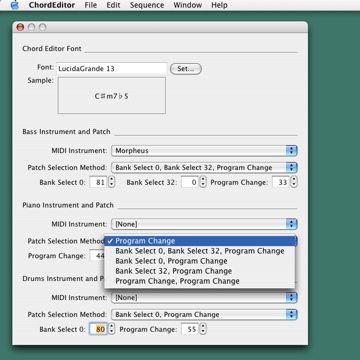
The code for choosing destination endpoints and patches has been integrated into my automatic accompaniment program. A few modifications were necessary so the same code can be used for different controls (or groups of controls) in the preferences panel. These are not very difficult to do but if I had to start over again, I would probably have considered using Cocoa bindings for implementing the preferences panel.
| Hey, What’re You Doing in My Backyard? |
Oh, eating stuffs :-). What are you doing in mine?

| GUI for Patch Selection |
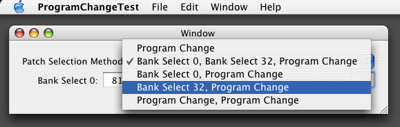
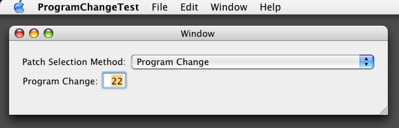
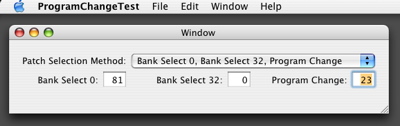
Worked out a little GUI for selecting the patch for a track. It turns out that different synthesizer manufacturers employ different methods for selecting patch banks. But the ones shown in the popup button below are the most common ones and are ones supported by Opcode Vision and Coda Finale. So that’ll be good enough for me for the moment.
| Sun | Mon | Tue | Wed | Thu | Fri | Sat | |
| 1 | 2 | 3 | 4 | • | |||
| 5 | 6 | 7 | 8 | 9 | 10 | 11 | ← |
| 12 | 13 | 14 | 15 | 16 | 17 | 18 | • |
| 19 | 20 | 21 | 22 | 23 | 24 | 25 | • |
| 26 | 27 | 28 | 29 | 30 | • | ||
| Aug Oct |


Lists
Less-Known Facts About Emacs
Chinese Restaurants in Calgary
Calgary/Banff Tourist Attractions
Top-10 Reason I Stopped Working on Emacs
Misc