MIDI Programs
MIDI File Player (External Device)
MIDI Destination Pop-Up Button
Other Programs
Cocoa Sample Programs
Syntax Coloring Using Flex
Algorithms
Jazz Chord Analysis as Optimization
A blog where I will write mostly about programming in Cocoa and CoreMIDI, and experiences from my ports of Emacs and XEmacs to the Mac OS.
| NSTextField and Undo |
It’s well-known that Cocoa text fields don’t provide proper undo support for editing actions taken within them. I have written about this before. Also when editing on a text field ends, most people would prefer that all changes to it be consolidated into a single undo action. The few discussions on this problem on the Cocoa programming mailing-list archives were unfortunately dominated by a poster who was trying to sell his book. One doesn’t get very much information from reading these posts. This reminds me of a guy who promotes his Lisp package on the Emacs newsgroups whenever anyone asks anything remotely related. But that’s a story for another time :-). Elsewhere, I found a solution by Tom Zepko, which looks quite promising and useful.
In any case, I’ve written a simple sample program to show how text fields can be made to support undo’s reasonably easily. Each text field requiring undo support is given its private field editor (an NSTextView). When editing ends, all undo’s associated with that field editor are removed and a new undo action representing the consolidated change is registered.
| Full-Feature (?) Document Windows |
I added the code for implementing toolbars in document windows to my automatic accompaniment program. The toolbar consists only of the (newly created!) “Play” and “Stop” buttons, and a counter that shows the current measure and beat. I also added a few controls to display and allow the user to change the tempo, style, and name of the song. These aren’t fully functional yet; I still need to write some more code.
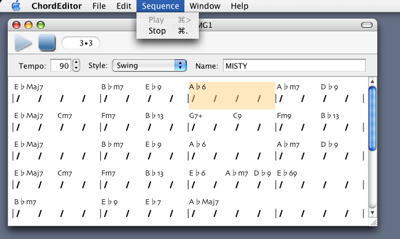
I also noticed a very nice design of Cocoa: the object that responds to a menu item or a toolbar item is also responsible for “validating” it. I.e., it decides whether the menu item or toolbar item is enabled in the menu or toolbar. E.g., my
NSDocument subclass responds to play: messages. Therefore Cocoa calls it to validate the “Play” menu item and the “Play” toolbar item. At any given time, only it can determine if the message can be handled. Makes a whole lot of sense, doesn’t it?
| Designing and Drawing Toolbar Icons |
This must be the hardest part of building a computer application for me: doing the art work. I wish I had an art department to do all the icon designs for me. But I don’t. So here I’m learning to use Gimp and trying to draw them myself.
The Web is full of tutorials and articles on drawing icons. As everything on it, some are better than others. For the use of Gimp, I find those at the Gimp User Group website most useful (e.g., one on the use of bump maps).
Anyway after a whole day of experimentation, here’re some I’ve come up with. These were made by simple application of bump maps.




| Sun | Mon | Tue | Wed | Thu | Fri | Sat | |
| 1 | 2 | 3 | 4 | 5 | 6 | 7 | |
| 8 | 9 | 10 | 11 | 12 | 13 | 14 | |
| 15 | 16 | 17 | 18 | 19 | 20 | 21 | • |
| 22 | 23 | 24 | 25 | 26 | 27 | 28 | ← |
| 29 | 30 | 31 | • | ||||
| Jul Sep |


Lists
Less-Known Facts About Emacs
Chinese Restaurants in Calgary
Calgary/Banff Tourist Attractions
Top-10 Reason I Stopped Working on Emacs
Misc