MIDI Programs
MIDI File Player (External Device)
MIDI Destination Pop-Up Button
Other Programs
Cocoa Sample Programs
Syntax Coloring Using Flex
Algorithms
Jazz Chord Analysis as Optimization
A blog where I will write mostly about programming in Cocoa and CoreMIDI, and experiences from my ports of Emacs and XEmacs to the Mac OS.
| FCBlogEditor Done |
I think I’ll finish early today. It was quite easy to add menu items for inserting tags. Using the WebKit, a single line of code gets you a live HTML previewer! Then a split view was generated by only a few clicks in the Interface Builder.
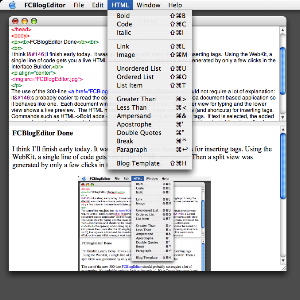
| FCBlogEditor - an HTML Editor with Syntax Coloring |
I’m now typing this blog entry in my brand new HTML editor! I have fleshed out the flex code I was playing with yesterday. The editor now displays HTML code in amazing technicolor as I type. The total lines of code is still less than 200. There just isn't any neater way to write this.
The reason I’m writing this editor is I want one that lets me type often-used tags, like <code>, <i>, etc., and close them in single key strokes. I’ll have to add the code to do this and add a live previewer tomorrow. After it is done, I'll be able to produce my entire blog using only programs I’ve written. I can get back to writing MIDI programs then.
| Syntax Coloring As You Type and Using Flex in a Xcode Project! |
I attain programming zen today :-). I have the crucial part of the code
for an HTML editor with syntax coloring. And it's only 50 lines long!
How do I get away with that? By using flex to scan and colorize tokens.
I discovered today that Xcode will correctly
compile and link a project with a .l file in it. The lexical analyzer
thus generated can then be used in the project (by calling yylex() as usual).
It's hard to describe how neat this is. I'll just let
the project speak for itself. Currently the test
program will colorize only the tags <b>, </b>,
<html>, and </html> as you type. But since these
are defined in lex, more can quite easily be added.
| Using FCBlog |
Today I added code to FCBlog for generating a RSS news feed for the blog.
As I worked on this, I noticed in my old rss.xml files,
BlogMax enters both the title and contents of an entry as descriptions. This
must have looked quite strange in a news reader. Therefore if my RSS didn't
work before, you may want to try again now.
I tried to validate some of my web pages and I noticed that AppleWorks generates
some HTML incorrectly. E.g., it messes up when trying to nest font and anchor tags.
So I'm now using the Taco HTML Editor to write
my blog entries.
Here's the new version of FCBlog. It's a command line
program. So after it's built, put it somewhere along PATH.
To set up a blog, create a directory, say Weblog. Copy into it the
templates directory that comes in the FCBlog2 archive.
Customize the values in templates/blog-dict.plist.
Then in Weblog create a directory for the year, with the four digit year
number (say 2003). In the year directory, create one directory for
each week that contains blog entries. A week directory is named
by the first day (Sunday) of that week, in the form mm-dd (say 11-02,
11-09, etc.). Within the week directory, HTML day files named
0.html, 1.html, 2.html,
3.html, 4.html, 5.html, and 6.html
represent entries for Sunday, Monday, ..., Saturday, respectively. So, for example,
if I blogged on weekdays in the week of November 2 and on Monday and Tuesday in the week
of November 9, my directory structure will look like this:
Weblog/
  2003/
    11-02/
      1.html
      2.html
      3.html
      4.html
      5.html
      image-file-for-one-of-the-day-entries.jpg
      more-image-files-for-other-day-entries.tiff
    11-09/
      1.html
      2.html
  templates/
Image and binary files referenced by the day files go into the same week directory.
The HTML file for a day entry must contain the tag <body>. The first
string following this tag enclosed in <b> and </b>
tags is taken to be the title of that entry. Everything that follows up to the
</body> tag is taken to be the contents. The first paragraph of
the day file must be terminated by a <br> tag. It is taken as
the description of the entry when generating the rss.xml file.Running
FCBlog in a week directory generates the blog page (named
index.html) for that week. Running FCBlog with any argument
also generates a rss.xml file in the top directory (Weblog).A
index.html file must be created in the top directory with the following
contents.
<HTML>
<HEAD>
<TITLE>Automatic Redirection</TITLE>
<meta http-equiv="Refresh" content="0; url=2003/11-09/index.html">
<script>
window.location = 2003/11-09/index.html;
</script>
</HEAD>
<BODY>
<P>This page will automatically redirect.
<P>If this does not work for any reason use the link below:
<P><A HREF="2003/11-09/index.html">2003/11-09/index.html</A>
</BODY>
</HTML>
The links in it must be changed every week.
Then the
rss.xml file, the index.html files
(both top-level and weekly blog pages), and the image and binary files are
uploaded to the web site.[BTW, the name Fish Creek Blog Builder is appropriate because beavers live along Fish Creek. Get it :-)? ]
| Fish Creek Blog Builder! |
I’ve decided not to use BlogMax/Emacs to write my blog any more. So I wrote FCBlog, a simple blog builder software. It has many advantages over BlogMax:
- It is very fast. It takes about a second to rebuild my past 3 months of messages, (excluding time for uploading).
- It takes HTML day entries as input. That means I can now write entries in Appleworks and then export them, or write HTML directly for stuffs too difficult for Appleworks.
- The day files, images, and binaries for each week reside in one directory so the directory structure for the blog is very clean.
- FCBlog generates a page per week. The blog is now much easier to browse.
- Navigation is improved. One can jump immediately to any day or week within the month from any page. Of course there are also links to the previous and following months.
- It’s simple (less than 300 lines!) and can be easily changed and extended.
So the entire site you’re now seeing is generated by FCBlog, Appleworks, TextEdit, and nothing else. Neat huh?
| Sun | Mon | Tue | Wed | Thu | Fri | Sat | |
| 1 | • | ||||||
| 2 | 3 | 4 | 5 | 6 | 7 | 8 | • |
| 9 | 10 | 11 | 12 | 13 | 14 | 15 | ← |
| 16 | 17 | 18 | 19 | 20 | 21 | 22 | • |
| 23 | 24 | 25 | 26 | 27 | 28 | 29 | • |
| 30 | • | ||||||
| Oct Dec |


Lists
Less-Known Facts About Emacs
Chinese Restaurants in Calgary
Calgary/Banff Tourist Attractions
Top-10 Reason I Stopped Working on Emacs
Misc