MIDI Programs
MIDI File Player (External Device)
MIDI Destination Pop-Up Button
Other Programs
Cocoa Sample Programs
Syntax Coloring Using Flex
Algorithms
Jazz Chord Analysis as Optimization
A blog where I will write mostly about programming in Cocoa and CoreMIDI, and experiences from my ports of Emacs and XEmacs to the Mac OS.
| A GUI Version of the Extendible MIDI Name Document Utility |
I repackaged all the code I have into this GUI version of the MIDI Name Document Utility. It requires the FCM framework I posted yesterday to build and run (the two project directories should reside in the same directory for the relative paths to work). Python modules that implement synthesizer-specific behavior can be put in either of the following directories.
  ~/Library/Application\ Support/MidNamUtility/
  /Library/Application\ Support/MidNamUtility/
The user directory will take precedence when two files of the same name appear in both directories. To use the utility, start it up. Select the sysex device from which you wish to fetch patch names in the popup button labeled “Sysex Device”. Then select the device type from the “Device Type” popup button. The list of device types correspond to all
<devicetype>.py Python module files the program can find in the two Python module directories. Then click the “Get Names” button and when sysex transfer is complete, you’ll be presented with a save panel to save the .midnam file.You can of course extend this utility by writing Python modules for you own synthesizers. The
JD-990.py and Morpheus.py files in yesterday’s project provide examples of what these modules should look like.
| Application Support Directory |
Just did a bit of cleaning up in this latest version of the FCM framework. Now the PythonEmbeddingTest uses the FCM framework instead of includes the source files directly. Also, a single Python module is used for each synthesizer: the property list that represents the fixed content of the .midnam file is moved into the Python module as the value of the variable plist.
I thought about where I should put the Python modules. The standard location seems to be in a user and/or system-wide “Application Support” directory. The prefix of the path to these directories can be obtained by the call:
NSSearchPathForDirectoriesInDomains(NSLibraryDirectory,
  NSUserDomainMask + NSLocalDomainMask, YES);
| Prototype of a Extendible MIDI Name Document Utility |
The PythonEmbeddingTest target of this revised version of the FCM framework is a functional replacement for the MIDI name document utilities for the E-mu Morpheus and Roland JD-990 I posted earlier. Everything synthesizer-specific is moved into two files for each synthesizer: a Python module that defines the function for fetching patch names from the synth and a property list file that defines the “fixed” portion of the .midnam file for that synth. To run the program, type:
./PythonEmbeddingTest <sysexdevicename> <outputxmlfilename>PythonEmbeddingTest expects to find the files
<sysexdevicename>.py and <sysexdevicename>.plist in the current directory. The listing below is that of the file JD-990.py. Notice how the Python formatting operator % allows the patch number and checksum to be inserted into the request sysex message easily. The code is much cleaner than its Objective-C/Foundation counterpart. The next step is to write a GUI for this program.import FCM import timedef getNames(device):
patchNameReq = '\xF0\x41\x10\x57\x11\x06%c\x00\x00\x00\x00\x00\x10%c\xF7'
time.sleep(1)
d = FCM.SysexDevice(device)
patchNameList = []
for i in range(64): d.send(patchNameReq % (i, 0x80 - (0x06 + i + 0x10) % 0x80))
while (d.bytesReceived() < 27): pass patchNameData = d.receive()
patchNameList.append(('P-%d%d' % (i/8+1, i%8+1), patchNameData[9 : 25], i)) time.sleep(0.3)
d.close()
return [('Patches', patchNameList)]
| Bug Fixes and Improvements for Fish Creek Blog Builder |
I have revised FCBlog to include a few bug fixes and improvements. A problem is now fixed in the code that didn’t determine the following month correctly when a month number rolls over (we’ve just gone into December!). FCBlog now recognizes the optional arguments -i and -r which tell it to generate the top-level index.html and rss.xml files, respectively. RSS generation is improved so the output is better accepted by RSS validators.
The code is slightly bigger due to these enhancements. But remember: everything you see at this web site is created using only the FCBlog builder and editor. At less than 400 lines each, still very small programs.
| Building Gimp 1.3.23 from Source!! |
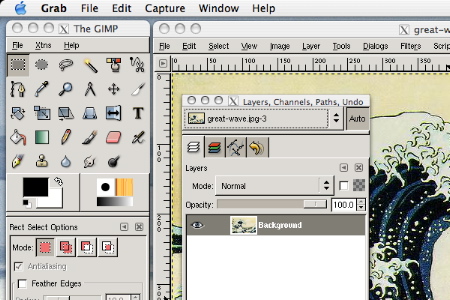
There’s a company on the Internet selling a CD-ROM/downloadable “distribution” of Gimp 1.2 for OS X. Strangely they’ve renamed the product MacGimp (I don’t think you have the right to name a software if you’ve just compiled it!). For a long time, they did not post the method for building the Gimp binary, nor any source code, it seems. People in newsgroups complain how illegal/immoral/sleazy/questionable this is. I believe the way to combat such behavior (apart from legal action) is simply to widely distribute information needed to build the program. I’m providing the information below for building Gimp 1.3.23 not because I’m a free software advocate. I never was one. “But you ported Emacs,” you say. Well, that’s another story, for another time. To me it’s such a simple task to configure and build a few libraries that this information should be available freely anyway! Interestingly, neither the people at Fink nor DarwinPorts seem to have figured out how to build this. You see it here first on the entire Web!
- zlib-1.2.1
- libpng-1.2.5
- tiff-v3.6.0
- jpeg-6b
- pkgconfig-0.15.0
- freetype-2.1.5
- expat-1.95.7
- fontconfig-2.2.0
- gettext-0.13
- glib-2.2.3
- pango-1.2.5
- atk-1.2.4
- gtk+2.2.4
- libart_lgpl-2.3.16
- gimp-1.3.23
./configure --enable-shared
make
sudo make install
Here’re notes for building the individual packages.
zlib - Configure by typing “
./configure --shared”. Then edit the file Makefile so that:
libdir =/usr/local/lib
includedir =/usr/local/include
This step is very important because you shouldn’t overwrite Apple’s version 1.1.3 in
/usr/lib and /usr/include. Set the environment variable DYLD_LIBRARY_PATH to /usr/local/lib for the rest of this installation and the execution of Gimp.libpng - Don’t run configure. Type “
cp script/makefile.darwn Makefile”. Then edit Makefile so that:
ZLIBLIB=/usr/local/lib
ZLIBINC=/usr/local/include
tiff - Configure by typing “
./configure”.jpeg - Replace
ltmain.sh and ltconfig with ltconfig13 and ltmain13 from http://distfiles.opendarwin.org/. Replace config.guess and config.sub from those in /usr/share/libtool/.pkgconfig - In the
glib-1.2.8 subdirectoy, replace the files ltmain.sh, ltconfig, config.guess, and config.sub as described above for jpeg.gettext - Configure by typing “
./configure --with-libiconv-prefix=/usr --enable-shared”. Ignore warnings about multiple definition of _locale_charset.glib - Apply the following patch. Then run “
autoconf”.
--- configure.in.old Tue Aug 26 10:40:44 2003 +++ configure.in Tue Dec 2 20:18:33 2003 @@ -1408,6 +1408,15 @@gimp - Configure by typing “fi
+ case $host in + *-*-darwin*) + G_THREAD_CFLAGS="" + G_THREAD_LIBS="-lpthread" + ;; + *) + ;; + esac + # if we are not finding the localtime_r function, then we probably are # not using the proper multithread flag
./configure --with-shm=sysv --enable-shared --without-aa --disable-print”. Note that this uses SysV shared memory despite the note in configure.in. But this seems to work fine. After configuration, edit app/Makefile so that the line containing SYMPREFIX reads:
SYMPREFIX = _That’s it. Enjoy the very nice program Gimp!
Copyright (c) 2003 Andrew Choi. Permission to reproduce this note unmodified is granted provided that this copyright notice is included.
| Sun | Mon | Tue | Wed | Thu | Fri | Sat | |
| 1 | • | ||||||
| 2 | 3 | 4 | 5 | 6 | 7 | 8 | • |
| 9 | 10 | 11 | 12 | 13 | 14 | 15 | • |
| 16 | 17 | 18 | 19 | 20 | 21 | 22 | • |
| 23 | 24 | 25 | 26 | 27 | 28 | 29 | • |
| 30 | ← | ||||||
| Sun | Mon | Tue | Wed | Thu | Fri | Sat | |
| 1 | 2 | 3 | 4 | 5 | 6 | ← | |
| 7 | 8 | 9 | 10 | 11 | 12 | 13 | • |
| 14 | 15 | 16 | 17 | 18 | 19 | 20 | • |
| 21 | 22 | 23 | 24 | 25 | 26 | 27 | • |
| 28 | 29 | 30 | 31 | • | |||
| Oct Jan |


Lists
Less-Known Facts About Emacs
Chinese Restaurants in Calgary
Calgary/Banff Tourist Attractions
Top-10 Reason I Stopped Working on Emacs
Misc