MIDI Programs
MIDI File Player (External Device)
MIDI Destination Pop-Up Button
Other Programs
Cocoa Sample Programs
Syntax Coloring Using Flex
Algorithms
Jazz Chord Analysis as Optimization
A blog where I will write mostly about programming in Cocoa and CoreMIDI, and experiences from my ports of Emacs and XEmacs to the Mac OS.
| An Extendible, Customizable MIDI Name Doc Utility? |
A Python extension module for sending and receiving sysex messages like the one I posted in the last few days is quite useful and a lot of fun to play with. But that would be too easy :-). My goal is to write MIDI applications that are extendible and customizable. I want to use Python as a scripting language and let my users write plugins in it to extend my applications.
The PythonEmbeddingTest target in this new version of FCM demonstrates this concept. (Note that error checking in other parts of the project has again been improved.) The structure of a MIDI application with an embedded Python interpreter looks something like this:
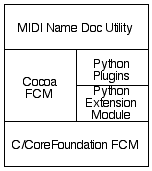
The new code in the FCM project demonstrates how MIDI name doc utility can import Python plugins and call functions in them. The code below is that of a Python plugin that fetches patch names from a E-mu Morpheus. It’s a bit more compact than the corresponding Objective-C code. The nice thing about such a design is users can write their own plugins for their synths (I can’t possibly write all of them) and manufacturers can write plugins for new devices (this ensure future usefulness of an application). It’s strangely satisfying to be able to implement a tool so quickly that harnesses the power of the Python language for solving the extendibility problem. The Opcode PatchTalk language, for those who know what it is, must have been much harder to implement, yet much less powerful. I believe many types of applications can benefit from a similar design.
import FCMdef getNames(device):
FCM.initializeClient() d = FCM.SysexDevice(device)
d.send('\xf0\x18\x0c\x00\x12\xf7') while (d.bytesReceived() < 3336): pass nameList = d.receive()
ramPresets = [] for i in range(127): ramPresets.append(nameList[7+i*13 : 7+i*13+12]) romPresets = [] for i in range(128, 256): romPresets.append(nameList[7+i*13 : 7+i*13+12])
d.send('\xf0\x18\x0c\x00\x50\xf7') while (d.bytesReceived() < 1672): pass nameList = d.receive()
hyperPresets = [] for i in range(127): hyperPresets.append(nameList[7+i*13 : 7+i*13+12])
d.close() FCM.terminateClient()
return [ramPresets, romPresets, hyperPresets]
| A More Robust FCM Python Extension Module |
Just added a bit more error and exception checking in this slightly improved version of the FCM Python extension module. When a library is called from an interpreter and not from compiled code, it should behave more gracefully when calls are made in sequences it doesn’t expect. At least it shouldn’t crash the interpreter!
I was looking for ways to debug the extension module in gdb. One can of course start gdb and “attach” the python process, which is what I’ve been doing. Apparently there isn’t a more convenient way (see this message in xcode-users). Perhaps one can create a little target in the same Xcode project that starts the Python interpreter. In the mean time, I suggest using attach in gdb running in a terminal or in Emacs.
| FCM Python Extension Module! |
I spent most of the day writing a Python extension module that wraps around the C/CoreFoundation code in FCM. As a result FCM can now be called from Python! It’s really a lot of fun to play with. The following is a transcript of the use of the extension module in the Python interpreter to send a preset list request sysex to a E-mu Morpheus and then receive the preset list data from it.
~/Documents/Programming/FCM-Python$ python
Python 2.3 (#1, Sep 13 2003, 00:49:11)
[GCC 3.3 20030304 (Apple Computer, Inc. build 1495)] on darwin
Type "help", "copyright", "credits" or "license" for more information.
>>> import FCM
>>> FCM.initializeClient()
>>> FCM.sysexDeviceNames()
['Morpheus']
>>> d = FCM.SysexDevice('Morpheus')
>>> d.send('\xf0\x18\x0c\x00\x12\xf7')
>>> d.bytesReceived()
3336
>>> b = d.receive()
>>> b
"\xf0\x18\x0c\x00\x13\x00\x02Mph:Z-Synth \x00Real:PnoVibe\x00Cmp:ElecPno \x00Pad
:Strings \x00Bass:UpRight\x00Gtr:Trippy  \x00Ld:Grunge   \x00Atm:RaveGruv\x00Voc
:Why?    \x00Drum:Sweep  \x00Mph:KlavKlip\x00Mph:FluteToo\x00Mph:AirStrg \x00Mph
:Voices  \x00Mph:Whisper \x00Mph:RhyOfLfe\x00Mph:MetalMlt\x00Mph:Phazbraz\x00Mph
:RezzSlth\x00Mph:SteinChl\x00Real:Piano  \x00Real:E.Piano\x00Real:StnBass\x00Rea
l:Flute  \x00Real:Mute Me\x00Real:MstyVib\x00Real:ExAcGtr\x00Real:Str<Chr\x00Rea
l:BrasStr\x00Real:StnTine\x00Cmp:ChikWill\x00Cmp:2 Pianos\x00Cmp:RingFire\x00Cmp
[...]
>>>
The document Extending and Embedding the Python Interpreter provides much of the information needed to write the extension module. Whatever information is lacking there can be found by reading the source code of Python modules and objects.Figuring out how to use put the source of the extension module in an Xcode project requires a bit of experimentation. I ended up using a shell script build phase that invokes the Python
distutils. Once the input and output dependences in the information panel of the shell script build phase have been set up properly, building the target behaves very much as one would expect. Note that to add items to it, hit the return key when the “inputs” or “outputs” box is selected. This isn’t obvious because add and delete buttons are missing from the information panel. Of course one can still build from the command line by typing
python setup.py build
| Yet Another Version of the Fish Creek MIDI Framework |
The Fish Creek MIDI framework (FCM) has evolved again. This version implements everything, including send and receive requests, MIDI client, and sysex devices, in C/Core Foundation code. It currently handles only sysex messages. The handling of note messages will be implemented after completion of the “ensemble” interface.
The code has also been cleaned up a bit, making the interfaces for send and receive requests more symmetric. The set of C routines can be called from Carbon as well as Cocoa, and can be wrapped more easily in API’s in different languages, compared to mixed C and Objective-C code. This is demonstrated by a simple Cocoa wrapper which behaves like the previous FCM API. That’s why the test programs NamesAndDeviceUIDsTest, SendTest, and ReceiveTest require no modifications to call this code. Here’s a version of SysExSenderX that uses this new FCM. A few simple modifications were necessary due to renaming of object methods.
| Building Gimp 1.2.5 from Source |
It’s interesting that Mac users are willing to pay for pre-built/slightly enhanced free software. On the Mac I suppose it started as early as the many ports of TeX on Mac OS classic. I’m not thinking of Textures either, which I thought was a legitimate product; I’m thinking of the simpler ports. I was looking at MacGIMP and I wondered whether the developers had posted the source for building their “distribution”: I wasn’t able to find any on their web site.
Gimp can of course be built using Fink or DarwinPorts. But it makes little sense to install either of them only to build a single software package. APT makes sense for Debian, because the entire distribution is based on it. But no package management systems for my Mac, thank you.
Here’s how I built Gimp on Panther. X11 and its developer tools were installed but otherwise the installation was quite “vanilla”. Obtain the following source packages.
config.guess and config.sub in the root directory with ones in /usr/share/libtool/, and replace the files ltconfig and ltmain.sh in the root directory with ltconfig13 and ltmain13, respectively.Here’s how each package is configured. After that run
make and sudo make install.
| tiff-v3.6.0 | ./configure |
| libpng-1.2.5 | cp scripts/makefile.darwin Makefile./configure |
| jpeg-6b | (replace files as described above)./configure --enable-shared --enable-static
|
| glib-1.2.10 | (replace files as described above)./configure --enable-shared --enable-static
|
| gtk+-1.2.10 | (replace files as described above)./configure --enable-shared --enable-static
|
| gimp-1.2.5 | ./configure --disable-perl --disable-print
|
/usr/local/bin/gimp from an xterm. Easy, isn’t it? Just saved you $25 :-).
| Sun | Mon | Tue | Wed | Thu | Fri | Sat | |
| 1 | • | ||||||
| 2 | 3 | 4 | 5 | 6 | 7 | 8 | • |
| 9 | 10 | 11 | 12 | 13 | 14 | 15 | • |
| 16 | 17 | 18 | 19 | 20 | 21 | 22 | • |
| 23 | 24 | 25 | 26 | 27 | 28 | 29 | ← |
| 30 | • | ||||||
| Oct Dec |


Lists
Less-Known Facts About Emacs
Chinese Restaurants in Calgary
Calgary/Banff Tourist Attractions
Top-10 Reason I Stopped Working on Emacs
Misc