|
About Andrew Choi
MIDI Programs
MIDI File Player (External Device)
MIDI Destination Pop-Up Button
MIDI File Player (Internal Synth)
MusicSequence Sample Code
MIDI File Writer
MIDI Name Document Parser
NameConfigSetup
Fish Creek MIDI Framework
MidnamUtility
SysExSenderX
Other Programs
FCBlogEditor
FCBlog and Patch
Chinese Checkers Program
jyut6 ping3 Cantonese Input Method
Cocoa Sample Programs
Syntax Coloring Using Flex
NSTextField and Undo
NSToolbar
Implementing File Import
Launch Application and Open URL
Saving Uncommitted Text Field Edits
Algorithms
Jazz Chord Analysis as Optimization
Optimal Line Breaking for Music
Optimal Chord Spacing
|
|
|
|
A blog where I will write mostly about programming in Cocoa and CoreMIDI, and experiences from my ports of Emacs and XEmacs to the Mac OS.
|
Graphical User Interfaces for Dynamic Data
|
Saturday September 25, 2004
It took a bit of programming and testing to get the user interface for patch selection to work correctly. The challenge comes from keeping the data presented by the interface current and consistent, while its value may change due to operations occurring outside our application. If one hasnt written something like this before, its really quite a good programming exercise. This is a programming problem that one encounters more often than one may think: the same techniques may be used for implementing file browsers, real-time database system GUIs, and in fact any GUI representing live data. Im quite surprised that not more has been written about it.
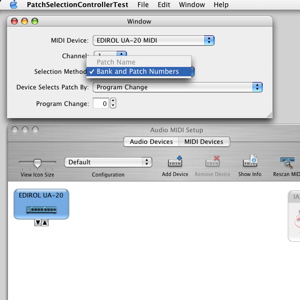
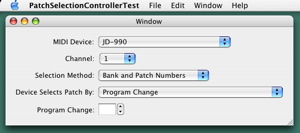
The following screenshots illustrate the external changes that may occur for our patch selection test program. Before an external MIDI device is specified in Audio MIDI Setup, the MIDI interface name appears in the MIDI Device menu. Of course no MIDI name document can be associated with the MIDI interface. So only the Bank and Patch Numbers selection method is enabled.
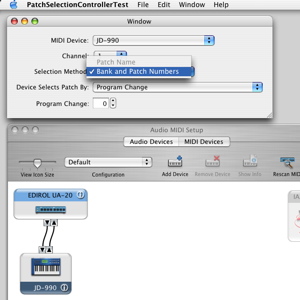
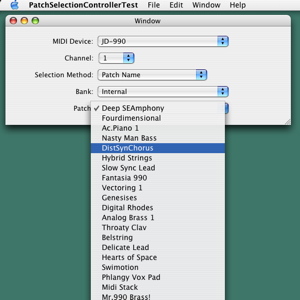
When an external device (a JD-990) is added in Audio MIDI Setup, the MIDI Device menu automatically updates to show its name. Note that no MIDI name document is associated with the device yet.
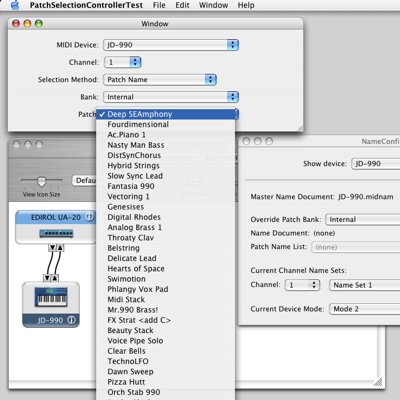
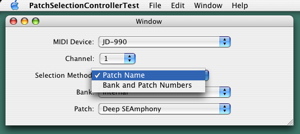
Using NameConfigSetup, a MIDI name document is associated the JD-990. Now the Patch Name selection method automatically becomes available.
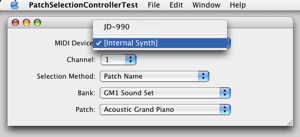
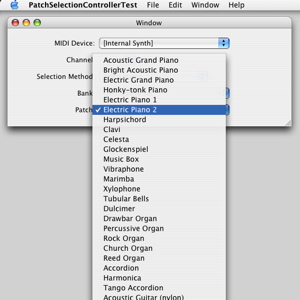
Apart from the code for maintaining a GUI for dynamic data, I also worked on using patch names for choosing General MIDI sounds for the internal synthesizer. The [Internal Synth] item always appear in the MIDI Device menu.
Here is the menu.
Thursday September 23, 2004
The links that were listed on the left-hand column of this page were getting a little out-of-date. So I added some new links and organized them by category. Also added some links on the right. Hopefully older entries in my blog will be easier to find now.
Wednesday September 22, 2004
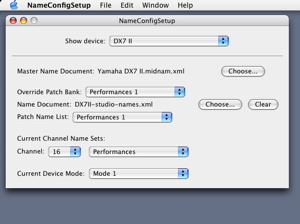
A while ago I posted a NameConfigSetup utility for associating patch name lists stored in MIDI name documents with MIDI devices. Since I now also have a GUI test program for selecting patches, I can more easily explain the use of that utility.
First we specify all the external MIDI devices connected in Audio MIDI Setup. In this example the setup consists of a single Yamaha DX-7 II.
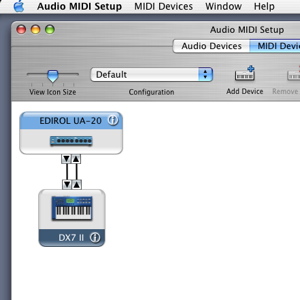
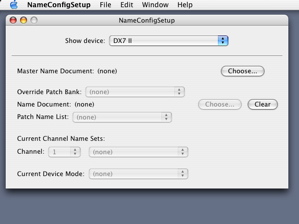
When an external MIDI device has just been added in Audio MIDI Setup, no master name document is associated with it, as can be verified in NameConfigSetup.
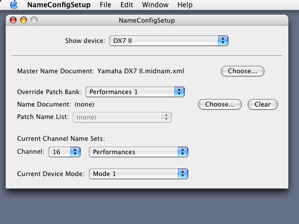
This means that MIDI applications cannot refer to patches by name yet. To enable this a master name document needs to be chosen for the MIDI device. When the Choose... button in NameConfigSetup is clicked, a open file panel appears where we can choose a MIDI name document. In this example we choose the file Yamaha DX7 II.midnam.xml which contains the names of factory default patches.
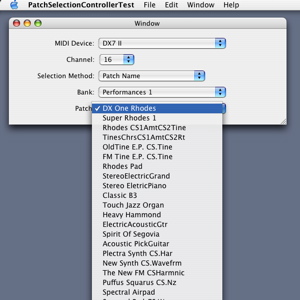
We can verify that patch names are now associated with the MIDI device in my patch selection test program. The patch names appear in the menu of the patch pop-up button.
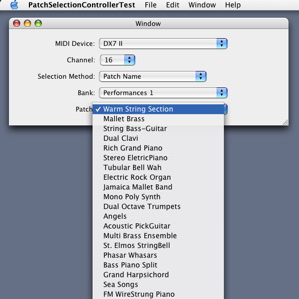
The design of the name config property of a device in CoreMIDI allows each of its patch banks to be overriden by a patch bank in MIDI name documents other than the master name document. One way to use this mechanism is to have a patch librarian application fetch patch names by exchanging sysex messages with a MIDI device, write out the MIDI name document that represents these patch names, and override the factory default patch names with these current ones. I wrote a utility called MidnamUtility that does exactly this (with embedded Python, I might add). After generating the MIDI name document (called DX7II-studio-names.xml in the example), I override the factory default performance names with those in it in NameConfigSetup.
Once this is done, the new patch names appear in the patch pop-up button in the patch selection test program.
|
Controller (in Model-View-Controller) for Dynamic Data
|
Tuesday September 21, 2004
Lets try to present the design of the user interface for selecting patches described yesterday as a design pattern. This is just a draft at the moment.
Controller (in Model-View-Controller) for Dynamic Data
Intent
We consider the design of the controller in a Model-View-Controller (MVC) implementation of a user interface that represents data that may change spontaneously under certain external influences.
Motivation
Consider the implementation of a pop-up button for selecting one of the destination endpoints in a MIDI setup. The contents of the menu of the pop-up button change when the MIDI setup changes due to operations occuring outside our application (being modified in Audio/MIDI Setup, e.g.). Such a change may invalidate the current state of our user interface (such as the current selection, menus, etc.). E.g., the current selection may no longer be present. The change may also invalidate the state of or change other parts of the user interface. E.g., the contents of a bank and patch pop-up button should change when a different destination endpoint is selected. A mechanism needs to be provided for notifying the relevant objects to allow them to return to a valid state.
Applicability
Use Controllers for Dynamic Data to control different parts of a complex user interface when each of these parts represent data that may change under external influences, and such changes influence other parts of the user interface in some way.
Structure
@interface ControllerForDynamicData : NSObject {
...
}
- (ControllerForDynamicData *)initWithControl:(id)control
stateChangedTarget:(id)target stateChangedSelector:(SEL)selector;
- (void)fill;
- (NSDictionary *)state;
- (void)setState:(NSDictionary *)newState;
@end
A ControllerForDynamicData object is associated with its set of controls in the user interface when it is initialized. A callback function is also registered, which will be called when the state of the controller changes, either due to external influences, or interactions at the user interface. The method fill is used to initialized the set of controls associated with the controller (such as populating the menu of a pop-up button). The method state returns the current state of the part of the user interface represented by the controller (e.g., the currently selected destination endpoint). The method setState sets this state (e.g., selecting the destination endpoint using stored preferences). Internally the controller carries out the operations to keep the controls in sync with the changing date represented (e.g., the menu of the pop-up button is updated whenever the MIDI Setup changes).
Participants and Collaborations
A top-level ControllerForDynamicData object may contain a number of ControllerForDynamicData objects. E.g., a patch selection controller may contain a destination endpoint selection controller, a bank and patch name selection controller, and a bank and patch number selection controller. Parent ControllerForDynamicData objects call the initialization, fill, and setState methods of its child ControllerForDynamicData objects, and listen to their call backs. These call backs may cause the fill and/or setState of sibling ControllerForDynamicData objects to be called. E.g., when the destination endpoint selection controller issues a call back to the top-level ControllerForDynamicData object to notify it of a state change, the latter calls the fill method of the bank and patch name selection controller to cause it to update the list of names in pop-up buttons under its control.
Consequences
The design of a complex user interface representing dynamic data can be broken down into a number of controllers, with well-defined interactions.
Implementation
Call back functions are easier to do in a language such as Objective C.
Sample Code and Usage
Some of this is implemented in EndpointPopUpTest.
Known Uses
My sample code. Dont know if there are other uses.
Related Patterns
Model-View-Controller.
|
Patch Selection Controller
|
Monday September 20, 2004
Heres a pretty clean design for an interface that supports all the different methods for selecting patches on a MIDI device. The mode of the device is set elsewhere (cf. last weeks discussion). Therefore we are left with pop-up buttons for choosing the MIDI device, channel, bank, and patch.
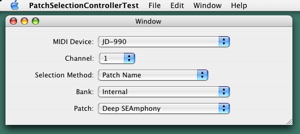
The Patch pop-up button lets the user select a patch by name.
But what if the device isnt associated with a MIDI name document? Thats what the Selection Method pop-up button is for: in addition to Patch Name, a patch can be selected by Bank and Patch Numbers.
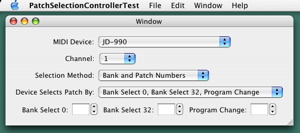
When this item is selected, the controls below that pop-up button changes to ones for entering bank and patch numbers.
But since different synthesizers have different methods of specifying banks and patches, the Device Selects Patch By: pop-up button allows the user to choose the appropriate method. The possible choices are:
- Program Change;
- Bank Select 0, Bank Select 32, Program Change;
- Bank Select 0, Program Change;
- Bank Select 32, Program Change; or
- Program Change, Program Change.
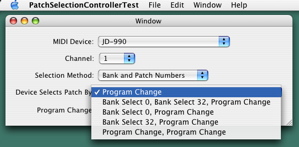
For example, when Bank Select 0, Bank Select 32, Program Change is selected, text fields appear for entering these three values.
This interface uses tab-less tab views, which makes the implementation a little easier. Ill write tomorrow about the structure of the entire controller. This has become a bit complex because of all the different methods of specifying patches that need to be supported.
|
Search this blog with
Lists
Less-Known Facts About Emacs
Emacs Rants
Chinese Restaurants in Calgary
Calgary/Banff Tourist Attractions
C++ Reading List
Science Fiction Series
Top-10 Reason I Stopped Working on Emacs
Top-10 Types of Questions I Get About Emacs
10 Defining Moments as Programmer
Misc
Carbon XEmacs
Emacs for
Mac OS X
|