Device Name Resolution in TOE refers to the following process: given a device description (what I called external handle
last week), identify the device that best corresponds to it, taking into account renaming, changes to the MIDI setup, etc. Here’re the steps I’m currently using (again, this is more powerful and intuitive than Unique IDs):
- Exact match.
- If the
Devices arrays in the device descriptions contain single devices, match the values of the keys Manufacturer, Model, and DeviceID if all three are present.
- If the
Devices arrays in the device descriptions contain single devices, match the values for the keys Manufacturer and Model if both are present.
- Match values for the key
DisplayName
Step 1 takes care of business when there is no change and renaming in the MIDI setup. When devices are renamed, or when the
same devices are connected to different ports and/or to different MIDI interfaces, steps 2 and 3 come into effect. Step 2 deals with cases when there are multiple devices of the same manufacturer and model in the MIDI setup. This is when a different Sysex Device ID must be chosen for these devices in AMS. When all else fails, step 4 is used and we hope for the best.
As a convenience feature, when a
CFStringRef or
CFDataRef is passed as the device description, a temporary dictionary is built with key
DisplayName and that value and step 4 is repeated. This allows users accessing TOE from an interpreted language to identify a device by name, which is sometimes more natural. For example in Python, instead of typing:
  d = TOE.SysexDevice({u'DisplayName': u'JD-990', u'Devices': [{u'Model':
    u'JD-990', u'DisplayName': u'JD-990', u'Manufacturer': u'Roland'}]})
he can simply type:
d = TOE.SysexDevice(u'JD-990')
or even
d = TOE.SysexDevice('JD-990')
Is that convenient or what?
I took part of
the FCM framework which I wrote a while ago and changed it so it can be added to TOE. That code now uses the device name mechanism and the SWIG code that I’ve been working on in the past few days. Now one can write scripts to transfer sysex messages in both Python and Scheme! Again more languages can be supported if we write more SWIG typemaps for
CFPropertyListRef.
Here’s a sample interaction that exercises some of these new functions. My Edirol UA-20 MIDI interface is connected to a E-mu Morpheus and the sysex message sent to it causes it to return the patch names in its first bank. Name resolution for devices is not completed yet so one needs to enter the entire device description to identify the sysex device at this time.
~/Documents/TOE/TOE/build/python$ python
Python 2.3.5 (#1, Mar 20 2005, 20:38:20)
[GCC 3.3 20030304 (Apple Computer, Inc. build 1809)] on darwin
Type "help", "copyright", "credits" or "license" for more information.
>>> import TOE
>>> TOE.Initialize()
>>> TOE.Devices(TOE.kDeviceTypesPairs)
[{u'DisplayName': u'IAC Driver Bus 1'}, {u'DisplayName': u'EDIROL UA-20 MIDI'}]
>>> d = TOE.SysexDevice({u'DisplayName': u'EDIROL UA-20 MIDI'})
>>> d
<TOE.SysexDevice; proxy of C SysexDevice instance at _0030b620_p_SysexDevice>
>>> d.NumOfBytesReceived()
0
>>> d.SendData('\xf0\x18\x0c\x00\x12\xf7')
>>> d.NumOfBytesReceived()
3336
>>> b = d.ReceiveData()
>>> b
"\xf0\x18\x0c\x00\x13\x00\x02Mph:Z-Synth \x00Real:PnoVibe\x00Cmp:ElecPno \x00Pad
:Strings \x00Bass:UpRight\x00Gtr:Trippy  \x00Ld:Grunge   \x00Atm:RaveGruv\x00Voc
:Why?    \x00Drum:Sweep  \x00Mph:KlavKlip\x00Mph:FluteToo\x00Mph:AirStrg \x00Mph
:Voices  \x00Mph:Whisper \x00Mph:RhyOfLfe\x00Mph:MetalMlt\x00Mph:Phazbraz\x00Mph
:RezzSlth\x00Mph:SteinChl\x00Real:Piano  \x00Real:E.Piano\x00Real:StnBass\x00Rea
l:Flute  \x00Real:Mute Me\x00Real:MstyVib\x00Real:ExAcGtr\x00Real:Str<Chr\x00Rea
l:BrasStr\x00Real:StnTine\x00Cmp:ChikWill\x00Cmp:2 Pianos\x00Cmp:RingFire\x00Cmp
[...]
\x00Tek:Shame   \x00Tek:Rave    \x00-defPreset- \x00\xf7"
>>> ^D
Here’s the similar interaction in Scheme! Note that a Scheme wrapper that defines
SysexDevice as a tinyclos class is generated automatically by specifying the
-chicken -proxy option (and thus the “class” notation). Note also the definition of the function
printchar to identify and correctly display non-printable characters.
~/Documents/TOE/TOE/build/chicken/Debug$ csi -q
#;1> (load-library 'TOE "TOE.dylib")
; loading library TOE ...
#t
#;2> (Initialize)
#;3> (Devices (kDeviceTypesPairs))
#((("DisplayName" . "IAC Driver Bus 1")) (("DisplayName" . "EDIROL UA-20 MIDI")))
#;4> (define d (make <SysexDevice> '(("DisplayName" . "EDIROL UA-20 MIDI"))))
#;5> (use lolevel)
; loading library lolevel ...
#;6> (SendData d (byte-vector #xf0 #x18 #x0c #x00 #x12 #xf7))
#;7> (NumOfBytesReceived d)
3336
#;8> (define s (ReceiveData d))
#;9> (define printchar
  (lambda (c)
    (if (and (>= c #x20) (< c #x7e))
        (write-char (integer->char c))
        (display (string-append "#x" (number->string c 16))))))
#;10> (for-each printchar (byte-vector->list s))
#xf0#x18#xc#x0#x13#x0#x2Mph:Z-Synth #x0Real:PnoVibe#x0Cmp:ElecPno #x0Pad:Strings
#x0Bass:UpRight#x0Gtr:Trippy  #x0Ld:Grunge   #x0Atm:RaveGruv#x0Voc:Why?    #x0Dr
um:Sweep  #x0Mph:KlavKlip#x0Mph:FluteToo#x0Mph:AirStrg #x0Mph:Voices  #x0Mph:Whi
sper #x0Mph:RhyOfLfe#x0Mph:MetalMlt#x0Mph:Phazbraz#x0Mph:RezzSlth#x0Mph:SteinChl
#x0Real:Piano  #x0Real:E.Piano#x0Real:StnBass#x0Real:Flute  #x0Real:Mute Me#x0Re
[...]
#x0-defPreset- #x0#xf7#;11> ^D
TOE is the name of the MIDI programming library I’m developing. Here’s how the name has come about. I wanted to call it
Extendible MIDI Applications Constructor Set, or EMACS for short. Of course the name Emacs is already taken. So I’m naming my new library
The Other Emacs, or TOE for short. People who know my work know that I did indeed work on
another Emacs (and in fact also
XEmacs). That’s why the name is so relevant. However TOE will be a project under my complete control so I should have a lot more satisfaction working on it. Specifically I need not deal with people with lots of opinions but can’t write good programs. I can just ignore them in a project I own :-).
I will write about software licenses and the rationale behind my choice of TOE’s license soon. Let me just state at this time that it will be a combination of the Perl Artistic License plus Knuth’s license for TeX. The spirit of its choice is closest to that of why people publish academic works. It should be clear that the reason I write software is for discovery and to have fun. I certainly do not write software to advocate software freedom, as people of the GNU project do, or claim to do.
Here’s a sample interaction showing some output from the function
Devices. I described its design
last week. Notice that it can be called from both Python and Scheme (Chicken). It can also be made to be callable from more languages (like Perl, Ruby, Ocaml, etc.) if we write more SWIG typemaps, as I’ve already discussed earlier. That is what’s so powerful in using SWIG in its development!
~/Documents/TOE/TOE/build/python$ python
Python 2.3.5 (#1, Mar 20 2005, 20:38:20)
[GCC 3.3 20030304 (Apple Computer, Inc. build 1809)] on darwin
Type "help", "copyright", "credits" or "license" for more information.
>>> import TOE, pprint
>>> TOE.Devices(TOE.kDeviceTypesDestinations)
[{u'DisplayName': u'IAC Driver Bus 1'}, {u'DisplayName': u'EDIROL UA-20 MIDI'}]
>>> # Make connections in AMS as shown in second screenshot
... pprint.PrettyPrinter().pprint(TOE.Devices(TOE.kDeviceTypesDestinations))
[{u'DisplayName': u'IAC Driver Bus 1'},
 {u'Devices': [{u'DeviceID': 17,
                u'DisplayName': u'JD-990',
                u'Manufacturer': u'Roland',
                u'Model': u'JD-990'},
               {u'DisplayName': u'Wavestation A/D',
                u'Manufacturer': u'Korg',
                u'Model': u'Wavestation A/D'}],
  u'DisplayName': u'JD-990, Wavestation A/D'}]
>>> pprint.PrettyPrinter().pprint(TOE.Devices(TOE.kDeviceTypesSources))
[{u'DisplayName': u'IAC Driver Bus 1'},
 {u'Devices': [{u'DisplayName': u'A-80',
                u'Manufacturer': u'Roland',
                u'Model': u'A-80'}],
  u'DisplayName': u'A-80'}]
>>> ^D
The first and second calls to
Devices to discover destinations were made when the setup in Audio MIDI Setup are in the following configurations respectively:
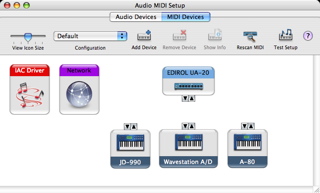
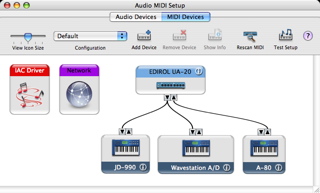
Notice that the Sysex device ID of the Roland JD-990 was set to 17 so this value is included by TOE in the device’s external handle. The call to find sources was made when the setup is in the second configuration and therefore the Roland A-80 is listed as one of the sources. Here is a sample interaction in Chicken.
~/Documents/TOE/TOE/build/chicken/Debug$ csi -q
#;1> (load-library 'TOE "TOE.dylib")
#t
#;2> (pp (Devices (kDeviceTypesDestinations)))
#((("DisplayName" . "IAC Driver Bus 1"))
  (("Devices"
    .
    #((("DeviceID" . 17)
       ("DisplayName" . "JD-990")
       ("Model" . "JD-990")
       ("Manufacturer" . "Roland"))
      (("Model" . "Wavestation A/D")
       ("DisplayName" . "Wavestation A/D")
       ("Manufacturer" . "Korg"))))
   ("DisplayName" . "JD-990, Wavestation A/D")))
#;3> (pp (Devices (kDeviceTypesSources)))
#((("DisplayName" . "IAC Driver Bus 1"))
  (("Devices"
    .
    #((("Model" . "A-80")
       ("DisplayName" . "A-80")
       ("Manufacturer" . "Roland"))))
   ("DisplayName" . "A-80")))
#;4> ^D

