MIDI Programs
MIDI File Player (External Device)
MIDI Destination Pop-Up Button
Other Programs
Cocoa Sample Programs
Syntax Coloring Using Flex
Algorithms
Jazz Chord Analysis as Optimization
A blog where I will write mostly about programming in Cocoa and CoreMIDI, and experiences from my ports of Emacs and XEmacs to the Mac OS.
| NSTextShowsControlCharacters |
Does it ever make sense for the text editor in Xcode to allow control characters (other than whitespaces) to be typed into a source file and keep them invisible? I can’t think of any instance that it does either. Unfortunately this is Xcode’s default behavior. You can change it by selecting the “Show Control Characters” item in the “Format” menu but that must be done for every new project. Usually the stray control character causes the compiler to issue an error message:
error: stray '\xx' in programIf you’re unlucky enough, your control character gets entered into the middle of a string and you end up wondering why a comparison doesn’t return the result you expect, or why a resource file won’t open. So, is there a way to tell Xcode to show control characters by default? Yes, and you do that by entering
defaults write com.apple.xcode NSTextShowsControlCharacters 'YES'
in Terminal.app. To cancel this setting, enter
defaults delete com.apple.xcode NSTextShowsControlCharacters
If you’re concerned about what these commands do, they only add and delete an entry in the file ~/Library/Preferences/com.apple.xcode.plist. In fact you can achieve the same result by editing that file directly. There is also a man page for the defaults command. There is an Apple documentation page for information on defaults you can set for the text system.
| Fedora Core 3 |
I worked on code obfuscation today so I don’t want to write about that :-). Perhaps I’ll talk about the installation of Fedora Core 3 Linux on my two old PCs last weekend.
I’ve used Linux for a long time; it started back in the days when I taught University. The first useful thing I did with it was to set up my office machine as a PPP server so I had Internet access from home. You would think that’s a job technical support should do. Let’s just say it would be a while later when they switched from dial-in terminal access to PPP service.
Nothing beats the Mac OS GUI. But when it comes to servers, Linux PCs still give you the highest cost-effectiveness. It’s very nice to have a machine that’s always running. It can be a local file server, mail server, CVS server, and what not. When one’s accustom to working in such an environment, it becomes second nature to delegate long term tasks (rsync, ISO downloads, etc.) to the server, which’s always on, and one can still enjoy the use of the Aqua GUI on the Mac.
I haven’t really put my PCs to good use in the past year or so. It will probably be necessary for me to run a server at home when my shareware goes on sale. So I thought it would be a nice time to get reacquainted with Linux distributions. Prior to this the distributions I was most familiar with were Debian and Red Hat. I wanted to minimize the learning of new stuffs :-) so these are the two distributions I looked at first.
I updated my Debian boot CD to one in the latest distribution (3.0r3) and noticed that only 15% or so of the files were updated from a year ago. As I had suspected, after installation the OS didn’t work that differently than the one I installed a year ago. Debian is generally quite conservative about bringing in new versions of programs into it. So one must fetch quite a few packages from unstable to get the latest tools. I also wonder if such a big distribution project can sometimes get to a point when contributors are happy where they’re instead of being motivated to move forward. Anyway I’m a bit disappointed by the progress they’ve made in the past year.
There’s no free Red Hat distribution anymore. Fedora Core is the all free Linux distribution that inherits a lot of code from the Red Hat Desktop product. Fedora Core is of course sponsored by Red Hat. To install it I had to download four ISO images. Luckily U of Calgary runs a mirror. The installation went well and since the Anaconda installer is the same one they used in Red Hat Desktop, everything looks nice and is done by pointing and clicking. I did have to use the text-mode installer for one of my PCs since the default setting didn’t work properly for its i810 video chip (after installation, X Window works fine when a "noaccel" option is specified for that device). On the other PC I needed to manually specify the video card before X Window can use the proper driver instead of the default SVGA driver (who would think that one should use the S3 Virge driver for an S3 TRIO 3D graphics card?).
The Linux desktop looks very nice after one switches to KDE (the default is Gnome) and sets the KDE default theme (to get rid of the Red Hat icons). The GUI is a bit slow on my PCs because they’re quite old (400MHz PII 256M and 550MHz PIII 128MHz). So it’s best to use X11 on my Mac and use the PCs as X clients. The system configuration and package utilities all have GUIs and work quite nicely. The NFS server, the firewall, and the services at a run level can be set up without reading the man pages, for example. If like me you haven’t use Linux for a while, and have an old PC (or two) lying around, you might find it worthwhile to spend a few hours to take a look at the current state of the penguin.
[To be continued...]
| Anti-Debugging (?) |
Most attempts to bypass software protection and license key verification code in a program will probably involve tracing its execution in a debugger. So, is it possible to detect that the program is being run under a debugger and take appropriate actions? And can such code itself be bypassed? Unfortunately the answers to both these questions are yes.
The Unix system call ptrace is used for implementing process tracing and debugging. A common method (described here) for detecting that a debugger is run counts on the fact that only one tracing process can be attached to our process. Therefore if our process creates a child who attempts to trace us, the attempt will fail if a debugger is already tracing us.
Another method (described here) depends on a debugger to always handle SIGTRAP and not pass it to the traced program.
Yet another method (described here) depends on certain system calls (such as nanosleep) to fail if interrupted when the program is running under a debugger.
There’s also the more direct method (described here) of retrieving process information and checking a certain P_TRACE flag bit.
There’s also some interested information on Apple’s now well-known and new PT_DENY_ATTACH request code to ptrace which they use to “protect” applications like iTunes (sample code). Protect is in quotes because the protection can easily be bypassed.
There are also discussions about techniques that depend on timing especially amongst PC software authors but these are probably quite processor dependent and thus tenuous.
Used in isolation, these techniques can be quite easily defeated, because they all make system calls and these can be trapped and bypassed. But since these calls are not particularly expensive, a number of them can be scattered throughout the code which makes detection and removal a little more difficult.
| Sample Shareware Program with Nag Screen and Registration |
I couldn’t find any sample programs that demonstrate shareware registration, storage of license keys, nag screen, and so on. So I wrote this one. It wasn’t very difficult to do, but it was quite useful to experience all the necessary features together and do a little fine tuning with the GUI.
I decided that a splash screen is too intrusive for registered copies of the program. So I’m not going to use one. However when an unregistered copy is launched, a “nag screen” comes on, which can only be dismissed after a short delay.
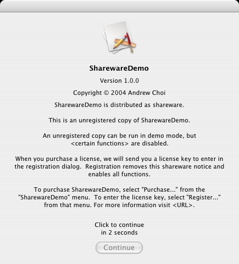
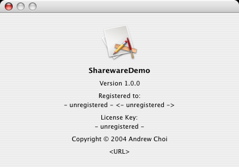
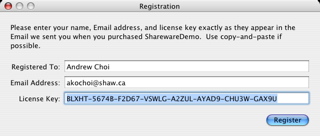
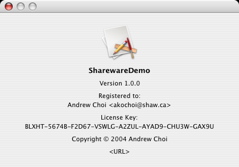
When a license key is purchased, the program can be registered by selecting the menu item “Register...”. A registration panel comes on for entering the user’s name, Email address and license key. The demo program will only accept the values displayed in the following image. The real program will of course perform public-key signature verification.
| Sun | Mon | Tue | Wed | Thu | Fri | Sat | |
| 1 | 2 | 3 | 4 | 5 | 6 | • | |
| 7 | 8 | 9 | 10 | 11 | 12 | 13 | • |
| 14 | 15 | 16 | 17 | 18 | 19 | 20 | • |
| 21 | 22 | 23 | 24 | 25 | 26 | 27 | ← |
| 28 | 29 | 30 | • | ||||
| Oct Dec |


Lists
Less-Known Facts About Emacs
Chinese Restaurants in Calgary
Calgary/Banff Tourist Attractions
Top-10 Reason I Stopped Working on Emacs
Misc