So
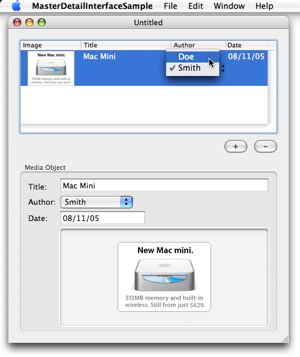
here’s the project that results when one completes the steps for
Creating a master-detail interface in
Cocoa Bindings Programming Topics. It shows you how to set up a GUI with a (master) table view the selection in which determines what are displayed in other (detail) views. It’s quite remarkable how little code this requires.
Here’s my simpler but still very useful
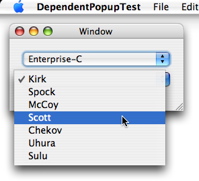
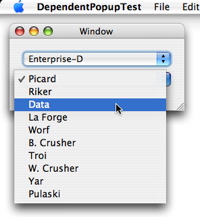
sample project that uses the same techniques in the master-detail interface sample. How often does one find it necessary to “re-populating” a popup button when the selection in another GUI element (say another popup button) changes? E.g., in a MIDI application, the choices available in a patch name popup button must be changed when a different MIDI device and/or channel is selected. Using Cocoa bindings, no code (except for that for maintaining the underlying data model, of course) is required to accomplish that.
The sample project displays a window with two popup buttons.
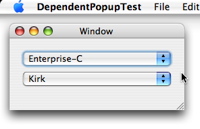
The first one lets you choose a star ship. Depending on that selection, the second one lets you choose a crew member of that star ship.
I couldn’t find any example on the Web that shows the use of Cocoa bindings for an
independent NSPopupButton (i.e., the first popup). So here it is. The key is to bind the selectedIndex attribute of the popup button view to the selectionIndex key of the array controller.
I’ve read a lot of Apple programming documentation in the last two weeks. I spent most of last week reading up on CoreAudio. These few days I’ve been reading about Cocoa bindings. Everyone seems to have tried to write about Cocoa bindings on the Internet but none of the material I can find is very good. So I ended up just reading Apple’s
Cocoa Bindings Programming Topic quite carefully, read the sample projects
ControlledPreferences and
BindingsJoystick, and worked on a few examples myself. That seems to be most effective way to learn it.
Perhaps instead of a tutorial, I’ll write about useful things I’ve found Cocoa bindings can do, and post a few sample projects. The simplest thing that one can use them for that I wish I knew about is tying together a stepper and a textbox containing an integer value.

That is very simple to do so I won’t post the solution for it. The next thing I found I can do with Cocoa bindings is to rewrite a little
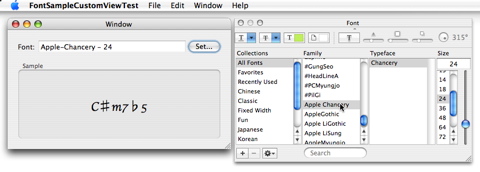
sample project I posted last year for choosing a font in the Font Panel, displaying a sample text in that font, and saving the font in user defaults. My
new sample project shows how to use the
user defaults controller, a
value with pattern type binding, and how to create a bindings-enabled custom view. It’s a lot simpler than the old project. The font sample custom view class is also more reusable.
I’ll try to show an example tomorrow that demonstrates a real strength of Cocoa bindings:
the master-detail interface.

