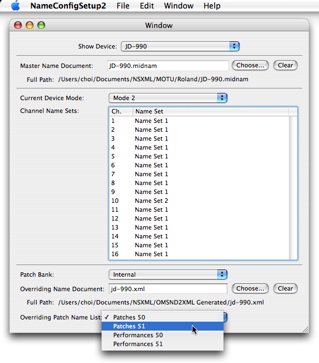
The beauty of using a “patch panel” for selecting patches is that a variety of cataloging and search functions can be added to it. What if you want to find a patch but only remember part of its name? Here’s an example of an
NSSearchField added to the patch panel that filters the patches displayed in the rightmost column of the browser for the current patch bank.
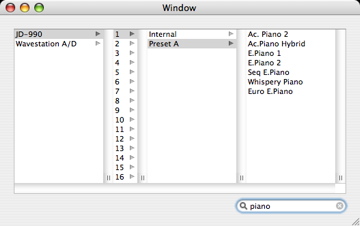
Here’s another that locates all the bass patches.
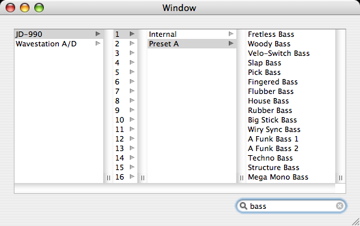
Interestingly, there aren’t any examples on the Web that demonstrate how to filter items managed by an
NSTreeController. I wrote
an example this morning that shows a simple mechanism for doing this.
I’m currently thinking about how a MIDI programming API should be designed. The question I ask myself repeatedly is: why does it take so much code and effort to handle MIDI playback, device and patch selection, volume and pan control, etc., in even a (relatively) small application like MyJazzBand? Wouldn’t it be nice if the API already takes care of all that and I can program at a level of abstraction that deals only with chords, scales, voicings, and so on? The problem with all existing MIDI programming API’s is of course: they all provide abstractions at levels that are too low!
Instead of tackling this big problem all at once, let’s start with the design of something simple, like an ensemble editor. I’ve written about the notion of an “ensemble”
a number of times. An
ensemble is a list of instruments. Each
instrument has a name, and corresponds to a MIDI device, a MIDI channel, and a patch selection (e.g., a bank name and a patch name). Consider how an instrument is specified by the user. First a MIDI device is selected. A MIDI channel that is available on that device is then selected. The
mode the device is in together with the MIDI channel determines which
name set to use. This in turn determines which patch banks are available. A patch bank and a patch are then selected.
Even for a simple MIDI setup, there are a large number of choices of instruments. Conventional MIDI sequencers let their users choose instruments by popup menus. The selection of patch bank and patch may be through the use of an hierarchical popup menu. I propose that a patch browser in a (floating) utility window, modeled after
NSFontPanel, provides much better user interaction for this purpose!
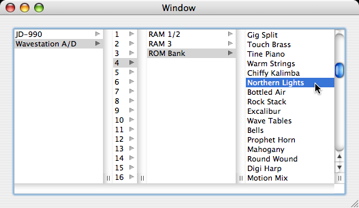
So today I wrote a
sample project that uses Cocoa bindings and
NSTreeController to display such a browser. Interestingly, I wasn’t able to find an example of the use of
NSTreeController with an
NSBrowser on the Web, so this project will also serve as such an example. It also contains a few examples of the use of
NSXML to extract symbolic patch bank and name information from MIDI name documents. It’s a pretty nifty program; I guess that’s what I’m saying.
A
name configuration is a property maintained by CoreMIDI with each MIDI device. MIDI applications, like my program MyJazzBand, can then use it to determine symbolic patch names to display for that MIDI device. A master name document (in MIDI name document, i.e., .“midnam” format) specifies a number of modes which a device can be put in, and the patch names that can be used for each channel of that device in each mode. Also, the patch name list for each patch bank specified by the master name document can be overriden by one in another MIDI name document.
Apple does not provide a utility to edit name configurations. So I wrote one called
NameConfigSetup last year. That was before the introduction of
NSXML and when
Cocoa bindings were just beginning to mature. Last week I rewrote
NameConfigSetup2 using these new technologies. The new code is a lot cleaner although it was still a bit of work to write, because of how name configurations and MIDI name documents are designed. Cocoa bindings aren’t without limitations. E.g., I don’t believe there is a straightforward manner to use them to present the patch name list overrides in a table, because the available choices of “overriding patch name lists” are different for different “overriding name documents”. Essentially that amounts to showing a different set of menu items for different rows of a table,
as I did using data source some time ago.