MIDI Programs
MIDI File Player (External Device)
MIDI Destination Pop-Up Button
Other Programs
Cocoa Sample Programs
Syntax Coloring Using Flex
Algorithms
Jazz Chord Analysis as Optimization
A blog where I will write mostly about programming in Cocoa and CoreMIDI, and experiences from my ports of Emacs and XEmacs to the Mac OS.
| GUI Detailing |
Wrote some code to draw bevels today so Carbon XEmacs can now draw modelines and vertical dividers more correctly. A vertical divider separates the two windows resulting from splitting a window “horizontally”. Here’re a number of windows created by a series of C-x 2 and C-x 3 commands.
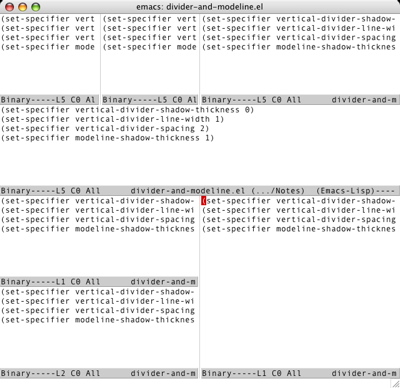
  (set-specifier vertical-divider-shadow-thickness 0)
  (set-specifier vertical-divider-line-width 1)
  (set-specifier vertical-divider-spacing 2)
  (set-specifier modeline-shadow-thickness 1)
make it look a little more modern:
| MULE, Anyone? |
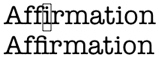
Let me explain the problem with the ability of ATSUI to use fractional text measurements and XEmacs’s to use only integral ones. The two lines below were drawn by Quartz 2D. The first was drawn in three parts: “aff”, “i”, and “rmation”. The second part is enclosed in a rectangle. Essentially this is how XEmacs draws a line with the cursor in it. The entire string on the second line was drawn at once.
- Turn off all font features (this prevents ATSUI from using ligatures).
- Set the line layout option kATSLineUseDeviceMetrics (this tells ATSUI to use integer for layout), and
- Set the line layout option kATSLineDisableAllLayoutOperations (this will disable kerning and other layout adjustments).
| Carbon XEmacs Bold and Italic Fonts |
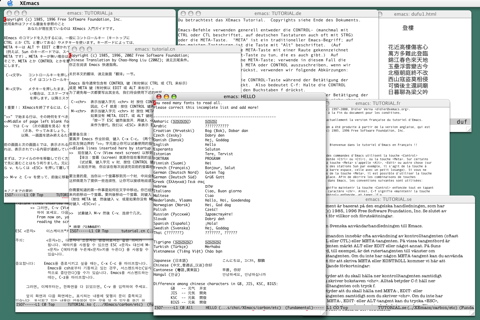
I’ve worked out the support for bold and italic fonts in Carbon XEmacs today. In ATSUI, all fonts have bold, italic, and bold-italic variants. Some fonts, like Times Roman, have separate font files for variants: Times Bold, Times Italic, and Times Bold Italic. Other fonts, like the ever popular Monaco and Andale Mono don’t, and their variants are generated algorithmically (like it was done in QuickDraw). Here’s a screen shot of part of a source file in c-mode and font-lock-mode, displayed in “Andale Mono:13”. Notice that the comment is in italics and keywords are in boldface.
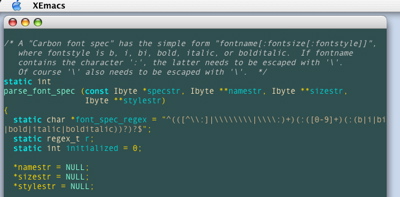
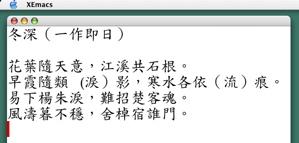
fontname[:pointsize[:style]], where style is b, i, bi, bold, italic, or bolditalic. Note that “Times Roman:10:b” and “Times Bold:10” are equivalent. All fonts installed on the system should be visible to ATS and therefore available for use in XEmacs. As I’ve mentioned yesterday, since ATSUI uses fractional text measurements and XEmacs doesn’t, approximations must be employed in specifying character locations and dimensions. This has made the handling of proportional-space fonts a little harder. Further complications arise from fonts containing both Roman and CJK characters, which have quite different font metrics (what “average character width” should one report for such a font?). I’ll still need to work on this problem a little more.Thanks to ATSUI’s use of Unicode, my port can already display characters in different encodings. Here’s an example of a few big-5 characters:
| Carbon XEmacs Fonts and Window Events |
Just a new screen shot of Carbon XEmacs to show what I’ve done today. The Carbon native “font instances” have obviously been working (at least partially) since I initially got XEmacs to run last weekend. What I didn’t tell you was all fonts seem to be displayed a little crooked except my default font, which is Monaco:10 (BTW, this is how a font is specified in Carbon XEmacs). I’ve fixed this problem today. It turns out to come from Quartz 2D’s use of fractional values for character and text measurements and XEmacs’s use of integral values. Monaco:10 characters are very close to 6 pixels wide so the problem doesn’t show up for them. For now each character will just be printed in the bounding box designated for them. Note that this should still allow fonts to be mixed in the same frame. Proportional-width fonts have never look quite right to me in Emacs anyway.
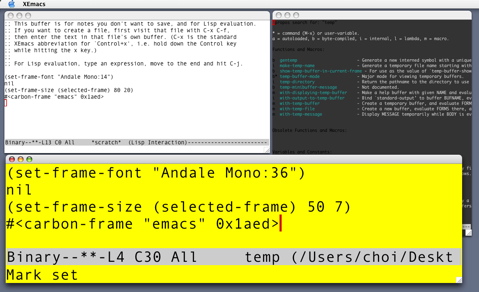
C-g problem, early on.
| Another XEmacs Screen Shot |
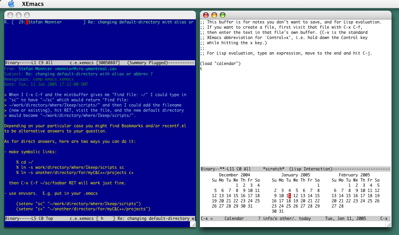
Here’s a screen shot of XEmacs running with two frames. The one on the left is doing Gnus, reading an article in comp.emacs.xemacs! Because my implementation of color instances was already working, all I needed to do to get the color display was to set the class of the Carbon device to “color”.
This may sound backward, but I really started by thinking about how I might debug the display code (and other code) once it is written. So one of my first steps was to make XEmacs into an Xcode project, so I can use Xcode’s GUI to gdb to debug it. There is one complication because the creation of the XEmacs executable requires a "dumping", or "unexec", step after compile and link: the loading of Lisp files and "freeze-drying" the resulting memory state so the final XEmacs executable can run without reloading them. For a number of reasons, I’ve decided to skip this step while XEmacs is being debugged. Running (and debugging) a “pre-dumped” XEmacs is made possible by using its “run-temacs” option. After fixing up a few paths (because the executable built by an Xcode project doesn’t end up in its usual place), I have a tty XEmacs that can be run and debugged in Xcode.
Then I needed to come up with the list of functions I had to write. I did this by reading a lot of code. Especially useful were the recent ports of XEmacs to BeOS and Qt, and to some extent the one to GTK. These are less complex than the well-established X and MSW code, which I also referred to at different times. Again my objective was not to understand the code in the other ports in detail, but to identify the files and functions I had to implement for the Carbon port. I also found it very useful to read “diff” files for the two simpler ports because they helped me identify places I had to change in the main distribution to make use of the added functions. I identified six new files that I had to write, each containing about ten functions, and about twenty places I needed to change in the source distribution. Of course once I started debugging, I’ve found more places where code must be added or changed. But armed with the initial list I compiled, I had a very good idea of where to begin.
Now comes the hard part of coding. It is hard because for a port of this size, one must write a lot of code before testing of the code can begin. In this case the six new files amount to about 3000 lines of code. The less-experienced may consider inserting stubs that print the values of the input parameters and proceed incrementally. But of course doing so will increase the time needed to do the port. I found it helpful to write small test programs to try out certain functions of an API, especially if I’m using them for the first time. This is the case for me with functions in ATS, ATSUI, Quartz 2D, and Carbon events.
In debugging XEmacs’s “redisplay” code, I found the Quartz 2D call
CGContextFlush to be tremendously useful. Selective placement of this call in the redisplay code combined with single stepping lets one see what each part of the code is drawing to the screen. Also quite useful was the insertion of small sections of code to draw rectangles in well-chosen colors, to check whether coordinates and dimensions are computed correctly. Apart from general techniques like these, all bugs must be dealt with according to their different nature.
| Carbon XEmacs!! |
What news would you consider worthy of being reported in the first 2005 entry of a pretty good programming blog :-)? How about this: I have ported XEmacs to Mac OS X!
More precisely, I have written preliminary native, Carbon implementations of console, device, event, frame, objects, and redisplay for XEmacs, and made changes to the 21.5.18 source distribution to make use of them, for those who are familiar with XEmacs architecture.
The code already works (albeit a little crude at this time) so one can play with it and start improving it. Of course much work still needs to be done. For example, menubar, toolbar, and glyph will need to be implemented. Here’re two screen shots that shows XEmacs’s splash screen and info display.
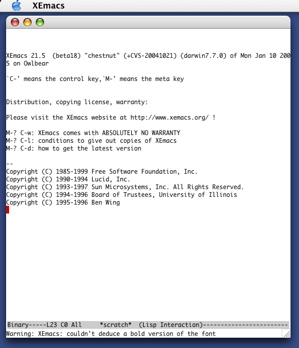
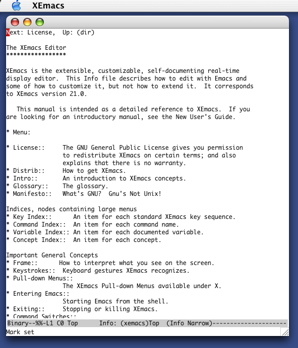
Why am I working on this? Haven’t I already ported Emacs to Mac OS X (and OS 8)? Well, I really don’t have a good answer for this. I was kind of playing with with the XEmacs source code after Christmas (eating lots of turkey sandwiches) and one thing led to another :-). Regular readers of this blog already know I don’t work on GNU Emacs any more because I was finding it difficult to work with Emacs developers and deal with Emacs users. I’ll probably find myself in the same kind of trouble again when this code for XEmacs is ready for release :-). Anyway I’ll worry about that later.
I’d say this however. Seeing that splash screen come up for the first time was just as exciting as when it did for Emacs 20 a few years ago. I was dancing around my iMac :-)!
Technologically, this new port will have many advantages over Carbon Emacs (remember, I also wrote that so I’m not bashing other people). It uses the ATSUI, ATS, and Quartz 2D API’s, which will allow very interesting things to be done: e.g., transparency and Unicode fonts, just to name two! XEmacs is much better structured than Emacs and the port will be a lot cleaner and easier to extend and improve on. I also know a little more so I can write better code. The disadvantage is there seem to be fewer people using XEmacs than Emacs. Let’s try to change that :-).
| Sun | Mon | Tue | Wed | Thu | Fri | Sat | |
| 1 | |||||||
| 2 | 3 | 4 | 5 | 6 | 7 | 8 | |
| 9 | 10 | 11 | 12 | 13 | 14 | 15 | ← |
| 16 | 17 | 18 | 19 | 20 | 21 | 22 | • |
| 23 | 24 | 25 | 26 | 27 | 28 | 29 | • |
| 30 | 31 | • | |||||
| Dec Feb |


Lists
Less-Known Facts About Emacs
Chinese Restaurants in Calgary
Calgary/Banff Tourist Attractions
Top-10 Reason I Stopped Working on Emacs
Misc