MIDI Programs
MIDI File Player (External Device)
MIDI Destination Pop-Up Button
Other Programs
Cocoa Sample Programs
Syntax Coloring Using Flex
Algorithms
Jazz Chord Analysis as Optimization
A blog where I will write mostly about programming in Cocoa and CoreMIDI, and experiences from my ports of Emacs and XEmacs to the Mac OS.
| XPM!! |
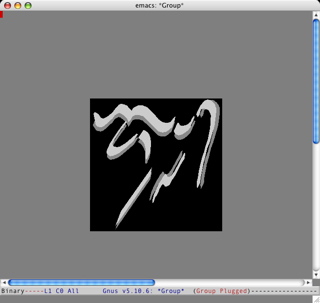
I know, the background color isn’t right yet. But after a really long day of work, I’m happy as a clam to be making this screen shot. What’s remarkable about this implementation is that routines have been extracted from the XPM library and linked statically into Carbon XEmacs. Therefore you don’t have to have X Window installed to build or run Carbon XEmacs with XPM support. In fact the difficult problem I’ve faced apart from writing new code has been to get the right parts of the XPM library to work without the X Window include files and libraries!
| Scrollbar Redisplay and CG Context |
Fixed a problem with my implementation of scrollbar display today. The fix is a little kludgy but it’ll have to do for now. Scrollbars now work reasonably well, and appear and disappear in the frame as expected. The problem arose because XEmacs changes the bounds and visibility of scrollbars during redisplay, and the beginning and end of redisplay are marked by the creation and destruction of a Quartz 2D drawing context. Strangely Quartz 2D does not allow scrollbars (or any control, it seems) to be so modified in the middle of a drawing context, and complains about QuickDraw operations!
I spent a little time to look into the use of Carbon compositing windows and HIViews (in the Human Interface Toolbox). Unfortunately HIViews are recommended to perform their redraws only when requested (again, Carbon event loop model vs. XEmacs event loop model). There are also problems with obtaining low-level events like mouse-down, etc. I tried some code, but decided to go back to non-compositing windows for the time being.
| Live Scrolling |
Let me try to explain why live scrolling is so hard to implement in XEmacs. I didn’t do it quite right in my port of Emacs either. And I’m reminded of the reason why in the last few days. Grossly simplified, XEmacs’s event loop repeatedly calls the platform-dependent function emacs_XXX_next_event to fetch the next user, system, or timer event and processes it. The latter generally consists of evaluating Lisp expressions and updating the display. For a more detail description, see the XEmacs Internals Manual.
Of course Carbon has its own idea of an event loop: when a program starts, event handlers are installed for the application, menus, etc. The function RunApplicationEventLoop is then called which repeatedly fetches events and dispatches them to the installed targets. Fortunately instead of RunApplicationEventLoop, the functions ReceiveNextEvent and SendEventToEventTarget can be used, which fetches and dispatches one event, respectively. This is how Carbon event processing is tied into XEmacs’s event processing in the Carbon port.
However, when a Carbon scrollbar is set to do live scrolling, the call to SendEventToEventTarget with the event that represents it has been clicked only returns when the mouse button is released. During this time an internal event loop is run which sends events to targets to notify them to scroll and update the screen. This works fine for a program with a Carbon event loop. For the XEmacs port it means that between the time when the scrollbar is clicked and that when the mouse is released, control flow does not return to XEmacs’s event dispatch code for it to update the display and perform the live scrolling!
Of course the solution is to write our own mini version of “ReceiveNextEvent” that generates scroll bar events according to the location and the state of the mouse after it has been clicked and until it is released. My current implementation now behaves a lot like Carbon scrollbars. The up/down button and page up/down parts all support auto-repeats (i.e., clicking on them and holding down the mouse causes the window to scroll repeatedly). When the mouse button is held down, moving the mouse out of a part causes scrolling to stop and moving it into the part again causes scrolling to resume. Auto-repeat for the page up/down parts stops when the indicator reaches the mouse location. Of course the window live scrolls when the indicator is dragged. The only visible difference is the up and down buttons aren’t highlight when clicked. The function HiliteControl used to work in Classic but it doesn’t seem to any more.
This is probably the finest part of the code of the whole port :-), if only because I wrote two versions that didn’t work as expected in the past couple of days. And you think porting code is easy...
| Scrollbars |
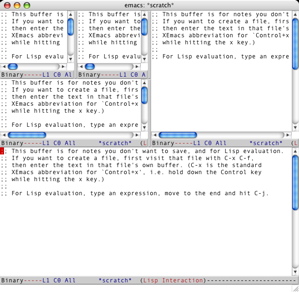
This is what scrollbars look like in Carbon XEmacs. There’re still a few glitches in my display code. I’ll try to iron these out tomorrow. Scrollbars are displayed nicely in XEmacs because their widths are calculated in pixels, not characters.
| Sun | Mon | Tue | Wed | Thu | Fri | Sat | |
| 1 | |||||||
| 2 | 3 | 4 | 5 | 6 | 7 | 8 | |
| 9 | 10 | 11 | 12 | 13 | 14 | 15 | • |
| 16 | 17 | 18 | 19 | 20 | 21 | 22 | • |
| 23 | 24 | 25 | 26 | 27 | 28 | 29 | ← |
| 30 | 31 | • | |||||
| Dec Feb |


Lists
Less-Known Facts About Emacs
Chinese Restaurants in Calgary
Calgary/Banff Tourist Attractions
Top-10 Reason I Stopped Working on Emacs
Misc