MIDI Programs
MIDI File Player (External Device)
MIDI Destination Pop-Up Button
Other Programs
Cocoa Sample Programs
Syntax Coloring Using Flex
Algorithms
Jazz Chord Analysis as Optimization
A blog where I will write mostly about programming in Cocoa and CoreMIDI, and experiences from my ports of Emacs and XEmacs to the Mac OS.
| XEmacs Installation Roots and Package Hierarchies |
For Carbon XEmacs to be used as a standalone application bundle, one must be able to move the latter anywhere on the disk and the application should still find the files it needs in the Resources subfolder. Evident of the flexibility of XEmacs’s installation and package system, a few lines of Lisp code added to setup-paths.el give XEmacs the ability to look for files in the right place. For more information, read the startup paths node of the XEmacs 21.5.18 info file.
Fixed a number of small bugs today; most are results of running XEmacs from the Finder instead of Xcode, and running a dumped rather than pure executable. Finally needed to write code to handle menubar events myself because I’m using ReceiveNextEvent instead of RunApplicationEventLoop. Kind of curious that this wasn’t necessary when the application is run under Xcode! Oh well, ...
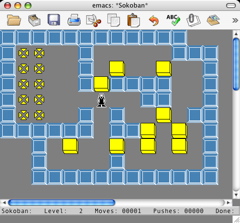
No new feature I can show in a screen shot. So I thought I include one running Sokoban.
| Standalone Application Bundle |
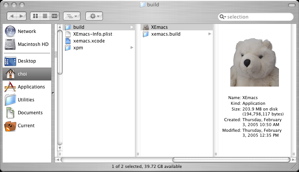
Carbon XEmacs can now be built as a standalone application bundle. I’ve been coding and debugging it in Xcode. Since I’m now thinking about its release, I made the necessary modifications to the autoconf, make, and config.h files so it can be built and bootstrapped as a clickable application for Carbon “in the usual way”. It has been a long day of work because build-and-test cycles are longer: one change to configure.in requires a make install. Following standard application bundle practice, Lisp files, executables, info files, and standard packages are put in its Resources folder. XEmacs also allows user-specific packages to be placed in .xemacs/xemacs-packages. Hopefully this makes it unnecessary for “packagers” to reinvent their own different file layouts, as has been done for Emacs.
I also resurrected the photo-realistic version of the color icon I used for Emacs for Mac OS Classic. It’s really just a picture of my teddy bear. Apart from that reason, I like it better than the water buffalo icon because it faces the right direction when the dock is on the right-side of my screen.
| Popup Menus |
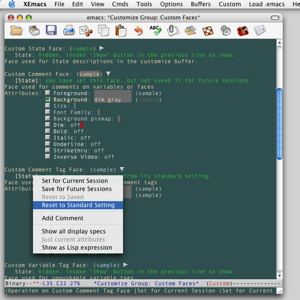
The toolbar items now work. Wrote some code for popup menus today. That’s really easy to do because popup menus’re just menus, which the code for the menubar already constructs. Here’s a screen shot of a popup menu for choosing the state of a customized variable. Notice that thanks to the now existing implementation of pixmaps, the switches and “disclosure triangles” in customize are also functional! I haven’t implemented widgets yet. But I think I’ll leave that for the future. Need to wrap this project up. I have to think about selling my MIDI shareware program.
| Toolbar!! |
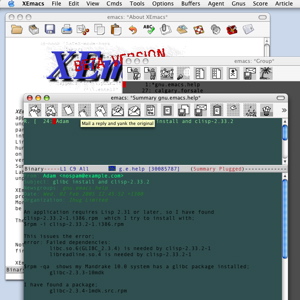
The toolbar has been difficult to implement because Carbon toolbars aren’t designed to change their contents as dynamically as XEmacs ones. In Carbon, a toolbar pretty much stays the same throughout the lifetime of its window, unless it is customized by the user. Its contents don’t usually change according to the editing mode in the window, as for XEmacs. After a lot of coercing, I got it to work. Of course customization, in the Carbon sense, has been turned off. The implementation is unavoidably inefficient although there aren’t any noticeable delays when switching toolbars. I’ve taken some icons from my Fedora Linux machine for the “initial” toolbar in the following screen shot (the frame in the background). Notice that I haven’t replace the icons for other modes yet (e.g., the Gnus ones in the screen shot). It takes a long time to pick, convert, and replace icons. Notice that “help text” works (frontmost frame, light yellow box). The toolbar items aren’t functional yet. I’ll work on handling commands tomorrow. After this, that should be a breeze.
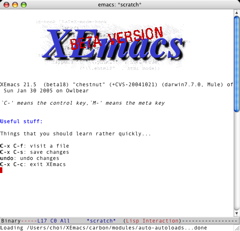
| Alpha Channel |
The transparency problem I had with XPM images yesterday is quite easy to fix. Here’s XEmacs’s splash screen with the XEmacs (beta version) logo.
| Sun | Mon | Tue | Wed | Thu | Fri | Sat | |
| 1 | |||||||
| 2 | 3 | 4 | 5 | 6 | 7 | 8 | |
| 9 | 10 | 11 | 12 | 13 | 14 | 15 | • |
| 16 | 17 | 18 | 19 | 20 | 21 | 22 | • |
| 23 | 24 | 25 | 26 | 27 | 28 | 29 | • |
| 30 | 31 | ← | |||||
| Sun | Mon | Tue | Wed | Thu | Fri | Sat | |
| 1 | 2 | 3 | 4 | 5 | ← | ||
| 6 | 7 | 8 | 9 | 10 | 11 | 12 | • |
| 13 | 14 | 15 | 16 | 17 | 18 | 19 | |
| 20 | 21 | 22 | 23 | 24 | 25 | 26 | |
| 27 | 28 | ||||||
| Dec Mar |


Lists
Less-Known Facts About Emacs
Chinese Restaurants in Calgary
Calgary/Banff Tourist Attractions
Top-10 Reason I Stopped Working on Emacs
Misc