MIDI Programs
MIDI File Player (External Device)
MIDI Destination Pop-Up Button
Other Programs
Cocoa Sample Programs
Syntax Coloring Using Flex
Algorithms
Jazz Chord Analysis as Optimization
A blog where I will write mostly about programming in Cocoa and CoreMIDI, and experiences from my ports of Emacs and XEmacs to the Mac OS.
| Unicode Clipboard Support |
Clipboard, pasteboard, scrap, selection, whatever you want to call it. Here’s a screen shot that demonstrates the clipboard support that I implemented for Carbon XEmacs today. The text in the XEmacs window is copied from Apple’s blurbs for OS X on their web pages in the respective languages.
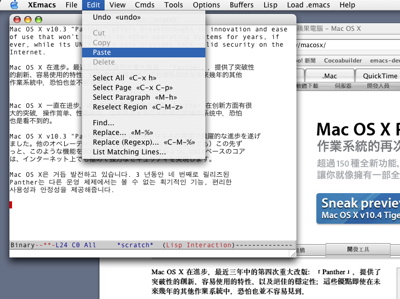
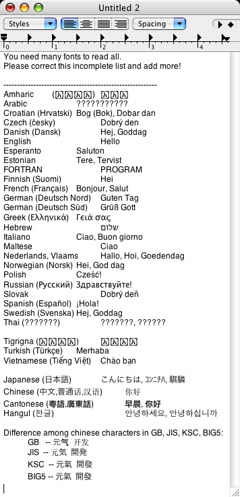
select-carbon.c file is only a couple of hundred lines long and was written in a few hours. Both TEXT and utxt (Unicode text) flavors are put on the scrap, and when both are present, a “get” operation prefers the latter. Of course one can also copy text out from XEmacs. Here’s a screen shot of a TextEdit window with the contents of XEmacs’s HELLO file.
| Mouse and Mouse Wheel |
Well, I’ve got mouse events (including mouse wheel events) working. Buttons 1, 2, and 3 can send button press and release events. The mouse wheel rolled up and down send button 4 and 5 release events, respectively. Single, double, and triple clicks work, thanks to XEmacs’s code to recognize them. I only had to provide millisecond resolution time stamps for the events. Mouse drags work. Mouse drags can follow single, double, and triple clicks, which extend the selection by characters, words, and lines, respectively. Modifiers associated with button presses are also passed along with the events. Scrolling also occurs automatically if the mouse is moved off the frame during a selection. Kind of interesting to see, even though I haven’t implemented scroll bars yet.
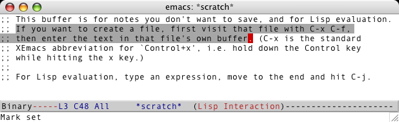
I also took another look at
C-g processing and found something it can’t handle: when XEmacs is in a loop that doesn’t call sleep-for or sit-for and doesn’t do I/O. Guess I’ll have to work on this problem some more.
| Window Activation and Magic Events |
Wrote some code to handle window activation today. Since XEmacs’s redisplay code doesn’t allow execution of code that modifies display objects during event polling times, Carbon window activation events are placed in the “magic event queue” so XEmacs can handle it when it’s able to. Of course I still had to write the code to handle the magic events myself! This is unlike events that are used to evaluate Lisp expressions, which I used for procesing menu commands in the past few days. XEmacs already has code for processing them. Anyway windows can now be activated by mouse clicks. I still have to display cursors correctly for active and inactive windows and write code to handle application activate and deactive events (i.e., suspend and resume).
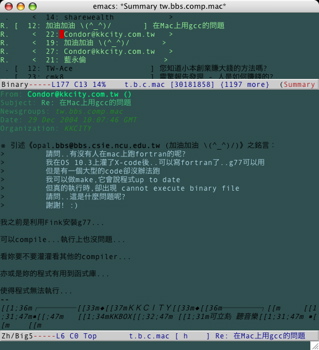
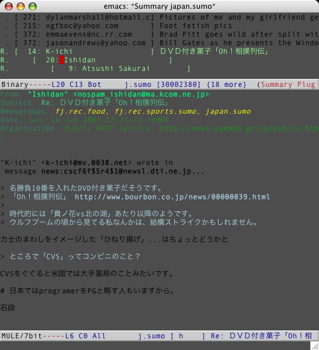
In the mean time, I have two more screen shots of Carbon XEmacs running Gnus reading a Chinese Big-5 and a Japanese news group, respectively. They show that text output by ATSUI looks quite nice. My implementation of font handling for XEmacs is more efficient than that I wrote for Emacs. For example, the HELLO file now comes up only in a fraction of the time.
| Menu Command Processing, Subprocesses, C-g Processing |
Just a short note; no screen shots to show. I finished up the implementation of menu display and menu command processing. The coding was complicated by the need to call Lisp functions and evaluate Lisp expressions in C call-back functions, and reentrance problems in redisplay must be avoided (warning and error messages cannot be written to the frame, for example). Anyway the menubar code is now quite reliable.
I tested my implementation of subprocesses (which lets XEmacs call external programs like ssh, gcc, and LaTeX). It seems to be working fine, so commands like M-x compile work. Not a lot of code needed to be written thanks to event-unixoid.c. I did write some code in carbon-event.c, and my simple scheme of calling ReceiveNextEvent (to look for Carbon events including timer events) and select (to look for process input) alternately seems to be working well.
Then I tested C-g (or quit character) processing, which also seems to be working well. It’s implemented by a very simple scheme of maintaining separate event queues for user, timer, and process events in event-carbon.c, and implementing the drain_queue callback to move events from these queue to XEmacs’s dispatch queue. The quit character allows one to break out of the execution of Lisp loops or (external) subprocesses. It seems to be working well in both cases. Since XEmacs looks ahead in the queue for C-g events, other keys can be typed before the C-g key but after one is stuck in a loop and quit still works as expected. If all this doesn’t make any sense to you, wait till you’re stuck in a loop.
| Could I Have the Menu Please? |
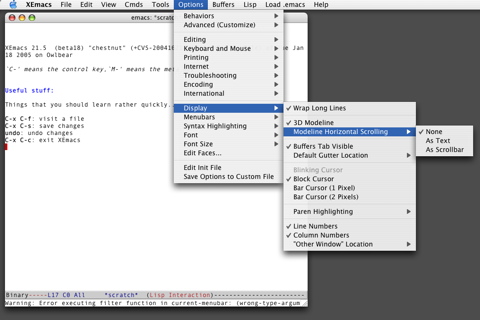
XEmacs’s menus are a complete system unto itself. The interface to the device-dependent code is deceptively simple: a single Lisp variable current-menubar completely describes the contents of the menus. Its value, however, may contain functions that are evaluated to determine whether menu items are active or selected, to generate the (suffix of the) text of menu items, and to generate or modify the menus and submenus themselves! Because of their dynamic nature, and for efficiency considerations, menus are created and filled on the fly as they are expanded. This all makes the coding a bit challenging and quite interesting. Anyway, here’s a screen shot of my Carbon implemenation.
| Sun | Mon | Tue | Wed | Thu | Fri | Sat | |
| 1 | |||||||
| 2 | 3 | 4 | 5 | 6 | 7 | 8 | |
| 9 | 10 | 11 | 12 | 13 | 14 | 15 | • |
| 16 | 17 | 18 | 19 | 20 | 21 | 22 | ← |
| 23 | 24 | 25 | 26 | 27 | 28 | 29 | • |
| 30 | 31 | • | |||||
| Dec Feb |


Lists
Less-Known Facts About Emacs
Chinese Restaurants in Calgary
Calgary/Banff Tourist Attractions
Top-10 Reason I Stopped Working on Emacs
Misc